
Physical Ball
Play Count0
Published2025-07-02
Supported DevicesPC + Mobile
CategoryArcade & Classic
Rating★★★★★5.0Rate this game
📝Physical Ball Overview
Swipe, release, and let physics do the smashing — every brick you shatter buys you one more second before the wall hits the line.
💬What is Physical Ball?
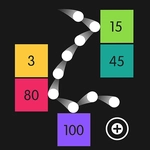
You get a ball, a wall of bricks, and a line at the bottom that you really don't want the bricks to touch. Swipe your finger to launch the ball, and from there the game turns into a chain reaction of bounces, smashes, and near misses. The core loop is simple, but the physics make every throw feel different. I've had throws that barely clipped one brick and others that ricocheted around for ten seconds straight.
The real spice comes from the items. A double-size pickup turns your ball into a wrecking ball that clears entire chunks of the wall, while extra ball drops multiply your chances with a single flick. But don't get cocky: those bricks keep marching downward, and the check-line is always closer than it looks. One moment I had three balls bouncing around like a pinball machine, and the next a fresh row of bricks slid into place right above the line — that's when you realize aim matters way more than speed.
It's the kind of game you load up for a quick round and then lose twenty minutes to without noticing. No download, no tutorial dump, just swipe-and-smash arcade fun that gets surprisingly tense once the bricks start crowding your zone.
👥How to Play Physical Ball
Aim at breaking all bricks by one shoot: Swipe your finger and throw balls,Make them roll among the bricks.
Hit items to make extra balls or double size ball.
Prevent the bricks to reach the check-line!
✨Game Tips
Don't waste your first throw: wait until bricks are grouped so one ball can knock out several at once.
Double size is a priority pickup — it turns bounces into screen-clearing sweeps.
Aim for the columns nearest the check-line first; those are the ones about to end your run.
Extra balls trigger more collisions, so grab them even if your current ball is still doing work.
A ball rolling along the floor can clear a whole row if you angle it right.
Don't panic when a wall of bricks gets close; a well-placed double ball can still save you.
🔧FAQ
Q: Is Physical Ball free to play?
A: Yes, it's completely free to play in your browser.
Q: Can I play Physical Ball on mobile?
A: Yes, the swipe controls work great on touchscreens and with a mouse.
Q: Do I need to download anything?
A: No download needed — just open the game and start swiping.
Q: How do I control the ball?
A: Swipe your finger or mouse to set direction and speed, then release to throw.
Q: What happens when bricks reach the check-line?
A: The game ends when any brick crosses the line, so clear them before they get there.
Q: Can I restart a level quickly?
A: Yes, you can restart instantly after losing a run to try a better opening throw.