
Pixel Draw
Play Count0
Published2025-07-04
Supported DevicesPC + Mobile
CategoryFun & Crazy
Rating★★★★★5.0Rate this game
📝Pixel Draw Overview
Pick a color and start dropping pixels — before you know it, an hour has vanished and you've got a tiny masterpiece.
💬What is Pixel Draw?
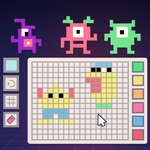
You get a blank pixel grid, a palette of colors, and a single tool: your mouse or finger. That's it. No enemies, no countdown. Just you, a grid, and whatever image you feel like building. I've lost whole afternoons to this kind of thing because the loop is so stupidly simple — click a square, it fills with color, you click another one. Before you know it, you've recreated a tiny mushroom or just made an abstract mess that looks weirdly cool.
What surprised me is how Pixel Draw sneaks a puzzle-like satisfaction into something that seems purely creative. When you're filling in a 16x16 grid, you start thinking about edges, symmetry, and color blocking. You might start with a rough outline, then fill the background, then panic because you filled the wrong pixel and have to switch to the eraser. (There's almost always an eraser, or you just overwrite with white.) It's forgiving in that way — no permanent mistakes unless you close the tab.
If you're the type who likes low-pressure games to unwind, this one does the job. It's not going to blow your mind with mechanics, but it's perfect for killing a few minutes between classes or while you're waiting for something else to load. And yeah, you can absolutely just scribble random colors until it looks like a glitchy rainbow. That's valid art too. I'd recommend starting small — 8x8 or 16x16 — before trying to draw a detailed face, because pixel art is trickier than it looks. Keep your palette limited, zoom in if the game allows, and don't be afraid to start over. The blank grid is always there, and it doesn't judge you.
👥How to Play Pixel Draw
Mouse click or tap to play
✨Game Tips
Start with a lighter outline color so you can see your shapes before committing to dark fills. Use the smallest grid first — a 16x16 canvas makes mistakes way less frustrating than a 64x64. If the game supports zoom, get close to see individual pixels; if not, squint or take a screenshot to check proportions. Limit your palette to 3–5 colors at first. Too many shades turns pixel art muddy fast. Tap or click deliberately — accidental pixels are easy to place and annoying to erase. Save a screenshot before closing the tab, because not all browser games keep your progress.
🔧FAQ
Q: Is Pixel Draw free?
A: Yes, it's a free browser game with no downloads or premium paywalls.
Q: Can I play Pixel Draw on mobile?
A: Yes, the tap controls work fine on phones and tablets.
Q: Do I need to download anything?
A: No, it runs in your browser as HTML5.
Q: What's the goal in Pixel Draw?
A: It's open-ended — color pixels, make art, or follow any in-game reference.
Q: Is Pixel Draw good for kids?
A: Absolutely, it's simple, has no violence, and encourages creativity.
Q: Can I save my pixel art?
A: Check for an export or screenshot option; if not, use your device screenshot.