
RCK Parking SuperCars
Play Count0
Published2021-02-17
Supported DevicesPC
CategoryDriving & Racing
Rating★★★★★5.0Rate this game
📝RCK Parking SuperCars Overview
Think you can parallel park a supercar without kissing a cone? RCK Parking SuperCars dares you to thread the needle at crawling speed.
💬What is RCK Parking SuperCars?
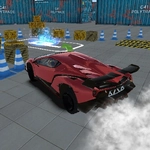
I've sunk more time into RCK Parking SuperCars than I'd like to admit. The setup is simple: you get a shiny low supercar, a parking bay that looks about two inches wider than the car, and a bunch of cones that exist solely to ruin your day. Use WASD to creep forward, Space to brake, and G to reset when you inevitably wedge yourself sideways. The Tab menu is your friend if you want to swap cameras or check the layout.
The real tension comes from the throttle. Real supercars are twitchy, and the game doesn't let you off easy — tap W a hair too long and your bumper is buried in a concrete pillar. I remember one run where I had the car perfectly lined up for a reverse spot, then accidentally hit G thinking it was the handbrake. Full reset. Cones laughed. You learn to brake early and steer late. The parking spots rotate, some require a three-point turn, and the hitboxes are brutal enough that clipping a cone ends the run.
It's not a huge game, but that's what makes it work. Each attempt takes maybe a minute, so you'll say 'one more try' fifteen times. If you like precision driving or just want to prove you can park better than your actual driving test, this one's a nasty little time-waster. Make sure to half-throttle when turning into tight bays — your car's nose swings wide, so start your turn earlier than feels safe.
👥How to Play RCK Parking SuperCars
Tab - menu
Space - Brake
WASD - Drive
G - reset car
✨Game Tips
Feather the W key instead of holding it — short taps keep you from lurching into cones.
Use Space to brake before you think you need to; braking distance is longer than it looks.
Hit G the moment you're stuck; don't waste time trying to wiggle out.
Switch camera angles with Tab to see the parking bay edges before committing.
For reverse parking, line up your side mirror with the bay's front line, then cut the wheel hard.
🔧FAQ
Q: Is RCK Parking SuperCars free to play?
A: Yes, it's completely free in your browser with no payment or subscription required.
Q: Do I need to download anything to play RCK Parking SuperCars?
A: No download needed. The game runs in any modern browser as HTML5.
Q: Can I play RCK Parking SuperCars on my phone or tablet?
A: The desktop controls use WASD and Space. Mobile support is limited, so a keyboard is recommended.
Q: What are the controls for RCK Parking SuperCars?
A: Use WASD to drive, Space to brake, G to reset the car, and Tab to open the menu.
Q: Why does my car keep hitting the cones?
A: Supercars have sensitive throttle. Tap W lightly and use Space to brake early for better control.
Q: How do I restart a level in RCK Parking SuperCars?
A: Press G anytime to reset the car to the starting position of the current parking challenge.