
Retro Street Fighter
Play Count0
Published2023-11-14
Supported DevicesPC
CategoryAction & Fighting
Rating★★★★★5.0Rate this game
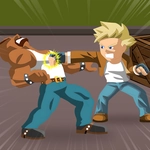
📝Retro Street Fighter Overview
Throw a fireball, land a spinning kick, and see if your pixel-perfect combos still hold up in this retro brawler.
💬What is Retro Street Fighter?
The moment the title screen flashes, you're back in the arcade with chunky pixels and a synth-heavy soundtrack. Retro Street Fighter doesn't pretend to be a modern fighter — it leans hard into the 16-bit era, right down to the stiff jumps and slightly unfair CPU reads. You pick your fighter (or jump straight in with the default) and trade blows across a single screen as health bars drain.
On keyboard, arrows move, J throws a punch, I kicks, K jumps, and L blocks. It sounds simple, but the timing is everything. I kept eating cross-ups because I'd jump in too early. The special moves — if you can call them that — require deliberate input. There's no quarter-circle motion here, just well-spaced normals and the occasional lucky anti-air. Mobile players get a virtual wheel and buttons, which works surprisingly well once you stop mashing.
The AI doesn't hold back. The second opponent starts reading your jump-ins and punishing blocked kicks with a throw. I lost three times in a row before I learned to block low. That's the charm: every loss teaches you something small, like which of your normals is safe on block or when to just walk forward and poke. It's not a deep competitive fighter, but it scratches that arcade itch when you have ten minutes and want to feel like a pixelated martial artist.
👥How to Play Retro Street Fighter
On PC, Arrow keys = move, J = punch, I = kick, K = jump, L = block.
On Mobile, Drag the move wheel, Tap the buttons to attack or defend.
✨Game Tips
Block more than you think. Holding L (or the block button) stops most chip damage and sets up counter pokes.
Don't jump constantly. The AI anti-airs hard, so stay grounded and poke with J from max range.
Learn which of your attacks is safe on block. Whiffing a heavy kick leaves you open for a full combo.
Use the move wheel on mobile with short swipes, not long drags. It's faster and keeps your thumb near the attack buttons.
Watch the CPU's pattern after a knockdown. Many opponents wake up with a throw, so back off or neutral jump.
If you're getting cornered, use K (kick) as a pushback tool. It has more range than the punch.
🔧FAQ
Q: Is Retro Street Fighter free?
A: Yes, it's completely free to play in your browser. No hidden fees or subscriptions.
Q: Can I play Retro Street Fighter on mobile?
A: Yes, the game works on mobile browsers. You'll get a virtual move wheel and tap buttons.
Q: Do I need to download anything?
A: No downloads needed. Just open the game page and it runs instantly on HTML5.
Q: How do I perform special moves?
A: There are no motion inputs. Use J for punch, I for kick, and combine with jump or block for variety.
Q: Is there a two-player mode?
A: The current version focuses on single-player arcade fights against the CPU. Local multiplayer isn't included.
Q: What are the PC controls?
A: Arrow keys move, J punches, I kicks, K jumps, and L blocks. Remapping isn't available.