
Save RED Square
Play Count0
Published2021-11-05
Supported DevicesPC + Mobile
CategoryAction & Fighting
Rating★★★★★5.0Rate this game
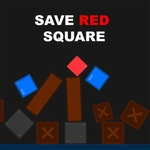
📝Save RED Square Overview
Your fingertip becomes the only wall between a fragile red square and an avalanche of falling hazards. Can you clear the path fast enough?
💬What is Save RED Square?
Save RED Square looks simple at first glance, but it's the kind of game that quietly rewires your reflexes. A red square sits center screen, immobile and completely helpless, while the world around it tries to crush, skewer, or smother it. Your job is to tap any obstacle before it lands. Tap a falling block and it vanishes. Miss one and the square takes a hit. Three hits and you're restarting from zero. That pressure turns every second into a tiny decision.
The early levels lull you into thinking it's just whack-a-mole with extra steps. Then the game starts throwing curved balls — obstacles that split into two, ones that need two taps, or decoys that look dangerous but aren't. I remember a run where two blocks dropped on opposite sides at once and I had to swipe-tap twice with one thumb while my other hand hovered over the pause button like a coward. That moment, not the score, is why I kept coming back. The screen gets crowded, your pulse climbs, and suddenly you're not tapping — you're conducting an orchestra of destruction.
It's not a long game. You'll fail, restart, and fail again within a minute. But each death teaches you something: tap sooner, lead your targets, never trust a calm screen. The minimalist art keeps everything legible even when twenty obstacles are in the air, which matters more than you'd think. There's no story, no characters, no fluff — just the square, the hazards, and your increasingly sweaty thumbs. For a browser game, that's honest design. If you want a five-minute adrenaline spike between classes or meetings, this is it. Just don't blame me when you start seeing red squares in your sleep.
👥How to Play Save RED Square
Tap on obstacles
✨Game Tips
Tap the obstacle's edge, not its center — some hitboxes are tighter than they look.
Prioritize obstacles that are closest to the square, not the ones falling fastest.
If two obstacles arrive simultaneously, use two fingers for a quick double tap.
Watch for decoy blocks that look solid but pass through harmlessly — don't waste a tap.
After a miss, the square briefly flashes; use that moment to reset your eyes to center screen.
🔧FAQ
Q: Is Save RED Square free to play?
A: Yes, it's completely free in your browser with no paywalls or hidden costs.
Q: Can I play Save RED Square on mobile?
A: Absolutely. The game works on touchscreens and actually feels better with direct taps.
Q: Do I need to download any files to play?
A: No downloads. It runs on HTML5, so just open the page and start tapping.
Q: What happens when an obstacle hits the red square?
A: You lose one of three lives. Lose all three and the run ends.
Q: Can I pause mid-game if I need a break?
A: Yes, most versions include a pause button, but pausing doesn't stop your high score.
Q: Are there different difficulty levels?
A: The difficulty ramps up automatically as you survive longer — no menus needed.