
School Connect
Play Count0
Published2021-01-06
Supported DevicesPC + Mobile
CategoryArcade & Classic
Rating★★★★★5.0Rate this game
📝School Connect Overview
Chain matching school icons before the timer taps out — your finger is the only eraser that matters.
💬What is School Connect?
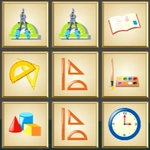
School Connect drops you onto a grid stuffed with pencils, apples, books, and other classroom clutter. The goal? Link three or more identical tiles in a single smooth drag, no lifting your mouse or finger. Lines can bend around corners, so a good run feels like drawing a secret path through a messy backpack. It's oddly satisfying to clear half the board in one sweeping motion and watch the remaining tiles cascade into place.
I kept coming back because the board isn't just random — there's a hidden rhythm to how new tiles spawn. Once you notice that connecting longer chains refills your time bonus faster, you start planning two or three moves ahead. The early levels lull you into a false sense of calm, then suddenly you're staring at a clock half gone and only scattered singles left. That's when the real game begins: do you grab a quick three to prevent a dead end, or risk a longer curved path for a score multiplier? The answer changes every round.
It's a perfect lunch-break pick — one hand on the mouse, no keyboard needed, and touch screens handle it just as well. There's no story, no dialogue, just pure chain-matching tension that gets your pulse up without demanding a shred of your attention for anything else.
👥How to Play School Connect
Use mouse or touch pad to play this game.
✨Game Tips
Plan your first link before you click — a path that bends three times can clear more than a straight line.
Keep an eye on the timer bonus: longer chains add more seconds back than two short ones.
If the board feels stuck, trace the outer edges first; matches often hide in corners.
Don't chase perfect shapes on later levels; a quick three-tile link resets your position and avoids a full grid lock.
Touch controls feel tighter if you use a stylus or the tip of your finger, not a thumb swipe.
🔧FAQ
Q: Is School Connect free?
A: Yes, it's completely free to play in your browser.
Q: Can I play School Connect on mobile?
A: Yes, touch controls work on phones and tablets without any extra setup.
Q: Do I need to download anything?
A: No downloads or installs — just open the game and start linking.
Q: What happens if I run out of time?
A: The round ends and you'll see your final score, then you can restart instantly.
Q: Does School Connect need a keyboard?
A: No keyboard needed; mouse or touchpad does everything.
Q: Can I play School Connect with friends?
A: It's single player only, but you can compare high scores by playing on the same device.