
ShapeHavoc
Play Count0
Published2021-03-18
Supported DevicesPC
CategoryArcade & Classic
Rating★★★★★5.0Rate this game
📝ShapeHavoc Overview
Crunch cubes, chase the perfect silhouette, and pray the wall doesn't crush you in this rapid-fire shape-matching arcade challenge.
💬What is ShapeHavoc?
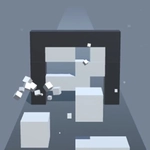
First time I played ShapeHavoc, I kept tapping the wrong cubes and wondering why my brain refused to rotate the silhouette 90 degrees in my head. The moving wall doesn't care about your spatial reasoning skills—it just keeps coming. You get a few seconds to visualize which blocks need to go, which ones need to stay, and then tap like mad. It's simple to understand, brutal to master.
The real tension is the countdown. Destroying cubes is easy, but the pattern isn't always obvious. Sometimes you'll see the target shape from one angle, but the wall's opening might be rotated. You must account for perspective, gaps, and the fact that one extra cube left behind means instant failure. I remember a level where the target was an L-shape, but I kept clearing the middle column because my brain saw a T. The wall arrived, the cubes didn't fit, and my run ended in a spray of pixels. The "one more go" factor is dangerous.
On mobile, tapping is responsive and fast; on desktop, mouse clicks do the same. There's no story, no upgrades, no fluff—just you, some cubes, and a wall that wants to end you. It's the kind of arcade purity that works in short bursts or long tilt sessions. If you enjoy games like Perfect Fit or spatial puzzles, this will scratch that itch.
👥How to Play ShapeHavoc
How to play?
On mobile : Tap the cubes to destroy them.
Your goal is to form a shape which can fit inside the moving wall. If
you can’ t form the ideal shape in time then the game is over.
✨Game Tips
Destroy cubes from the top down first; gravity doesn't matter here, but it helps you track what's left.
Pause and mentally rotate the opening before you start tapping—rushing into the first cube you see usually ends badly.
If you tap an extra cube by accident, you can't undo it, so treat each tap as a commitment.
On mobile, use your thumb to cover less screen, letting you see the moving wall's outline clearly.
Practice recognizing common silhouettes: L, T, S, and stair shapes appear more often than you'd think.
When the wall speeds up, prioritize clearing the biggest gaps in the target shape first, then fine-tune.
🔧FAQ
Q: Is ShapeHavoc free?
A: Yes, ShapeHavoc is completely free to play in your browser.
Q: Can I play ShapeHavoc on mobile?
A: Yes, the game supports touch controls on mobile devices.
Q: Do I need to download anything?
A: No download needed. It runs in any modern web browser.
Q: What happens if I tap a cube by accident?
A: That cube is destroyed permanently. There is no undo button.
Q: Can I restart a round quickly?
A: Yes, the restart option appears immediately after a loss, so you can jump back in.
Q: Does ShapeHavoc have levels or endless mode?
A: It features endless rounds with increasing speed and complexity.