
Shooting Zombie One
Play Count0
Published2023-03-20
Supported DevicesPC
CategoryAction & Fighting
Rating★★★★★5.0Rate this game
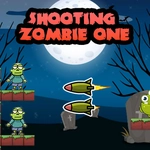
📝Shooting Zombie One Overview
Hold the line against waves of shambling dead—every click launches a missile, but only the right side will save you.
💬What is Shooting Zombie One?
I'll be honest—Shooting Zombie One isn't pretending to be deep. You've got a screen, two directions, and a pile of undead shuffling toward you. Click the left side of the screen and a missile rips in from the left. Click the right, same deal from the right. Your job is to line up shots so the missiles smash into zombies before they reach whatever you're protecting. The first few waves lull you into thinking it's easy. Then the screen starts filling up and your mouse hand starts cramping.
The real trick is timing. Missiles travel across the whole screen, so if a zombie is mid-screen on the right and you click the left, that missile has to cross the entire battlefield—plenty of time for the zombie to take another step. I kept getting clipped by fast ones until I started clicking the side closest to the threat. That sounds obvious, but under pressure you'll panic and click the wrong side. That's the whole game: panic management disguised as a shooting gallery.
Visuals are basic, no flashing lights to hide behind. Sound is probably minimal, but that's fine—you'll be too busy tracking two sides at once to care. It's the kind of game you fire up for five minutes and accidentally lose twenty to. Nothing revolutionary, but the difficulty curve hits a sweet spot where every death feels like your fault, not the game's.
👥How to Play Shooting Zombie One
Use Left Mouse Button to Shoot. Click Left Screen to get the missile from the left or vice versa.
✨Game Tips
Watch both edges of the screen at once instead of tracking one zombie—threats come from everywhere.
Click the side closest to the zombie to minimize missile travel time.
Don't waste clicks on empty space; every missile should have a target in mind.
Prioritize the fastest zombies first, even if they're not the closest.
If a zombie is exactly in the middle, click either side but lead your shot slightly.
Use short bursts of rapid clicking when a cluster forms, but keep an eye on the opposite side.
🔧FAQ
Q: Is Shooting Zombie One free to play?
A: Yes, it's completely free in your browser with no download needed.
Q: Do I need to download anything to play Shooting Zombie One?
A: No, it runs straight from the web page as an HTML5 game.
Q: Can I play Shooting Zombie One on my phone?
A: It's designed for mouse input, so a desktop or laptop is better, but some mobile browsers may work.
Q: What are the controls for Shooting Zombie One?
A: Use the left mouse button. Click the left side of the screen to launch a missile from the left, or the right side for the right.
Q: Does Shooting Zombie One work on school computers?
A: Yes, as long as the browser allows HTML5 games, it should run fine without any installs.
Q: Is Shooting Zombie One okay for younger players?
A: It features cartoon-style zombie shooting with no graphic gore, so it's generally appropriate for most ages.