
SideJump
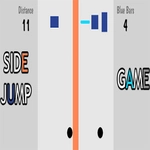
📝SideJump Overview
One click sends you flying sideways, one misclick drops you into the void — SideJump is the kind of brutal reflex game that ruins your afternoon in the best way.
💬What is SideJump?
SideJump doesn't waste time with tutorials or menus. You click, your little square launches toward the opposite wall, and you immediately start calculating the next gap. I lost my first six runs before I realized the jump arc isn't what you'd expect — it's more of a snap than a float, so you have to click earlier than feels natural. That moment when you finally thread three narrow ledges in a row? Genuine fist pump.
The difficulty ramps up by throwing moving platforms, spike strips, and shrinking safe zones at you. There's no health bar or lives system; one bad click ends the run. That sounds punishing, but restarting takes half a second, so you'll find yourself saying 'one more try' without thinking. The clicker DNA shows in the score chase — your best distance sits in the corner, mocking you until you beat it.
Is it deep? No. But it's exactly the kind of game you open during a boring class or while waiting for a download, then realize 40 minutes vanished. The physics feel consistent, the hitboxes are fair (mostly), and the minimalist art keeps everything readable. If you like frustrating-but-fair one-button games like Flappy Bird or Geometry Dash's cube segments, SideJump scratches that same itch.
👥How to Play SideJump
Use mouse to play.
✨Game Tips
Click slightly before you think you need to; the jump has almost no wind-up.
Don't watch your character — watch the gap ahead.
Moving platforms have a rhythm, so count the bounce instead of reacting to each one.
If you're stuck on a spike section, aim for the top corner of the landing zone; the hitbox is forgiving there.
After a death, take one breath before restarting — mashing the click immediately usually kills you again.
Your high score is the only thing that matters; ignore the cosmetic coins if you're just chasing distance.
🔧FAQ
Q: Is SideJump free?
A: Yes, it's completely free to play in your browser with no hidden charges.
Q: Can I play SideJump on mobile?
A: It works on mobile browsers, but the timing is easier with a mouse or touchscreen.
Q: Do I need to download anything?
A: No download needed — just open the game page and start clicking.
Q: What are the controls?
A: Click or tap anywhere to jump sideways. That's the only input.
Q: Is SideJump unblocked at school?
A: It's an HTML5 browser game, so most school firewalls won't block it.
Q: How do I pause SideJump?
A: There's no pause button; the run ends when you die, then restarts instantly.