
Sky Hunter 3D
Play Count0
Published2021-07-30
Supported DevicesPC
CategoryAction & Fighting
Rating★★★★★5.0Rate this game
📝Sky Hunter 3D Overview
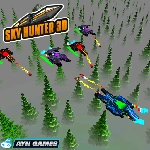
Tear through enemy squadrons in a sleek warplane that locks onto anything that moves, and watch your wing-mounted cannons do the rest.
💬What is Sky Hunter 3D?
Sky Hunter 3D throws you into the cockpit of a warplane where the guns basically think for themselves. You don't mash a fire button — you just fly, and the moment an enemy fighter wanders into your sights, the cannons light up. It sounds too easy, but that auto-fire twist actually changes how you approach every dogfight. Instead of worrying about trigger timing, you're free to focus on the stick: banking hard, looping over rockets, and lining up the next target before the last one finishes exploding.
The mouse controls feel twitchy in a good way. Push the cursor up and the nose climbs; jerk it left and you snap into a roll that would make a real pilot black out. Enemy planes drift in from all sides, some behind you, others diving from above, and the 3D space means you can't just hold a steady circle. I caught myself leaning into turns, which is always a sign the physics are doing something right. The auto-fire has a small quirk: if an enemy is just at the edge of your view, the guns might hesitate for half a second. That half-second taught me to fly slightly ahead of the target instead of dead-on.
There's no story to bog you down, just waves of increasingly aggressive fighters and the occasional ground threat you can strafe for bonus points. The graphics are simple but clean — distant clouds, a sun that glares when you bank toward it, and enemy planes that trail smoke when you clip a wing. It's the kind of game you open for five minutes and then realize an hour vanished. If you're after a quick aerial fix without a 200-page manual, this one lands it.
👥How to Play Sky Hunter 3D
Steer the warplane with the mouse. When the warplane sees the enemy, it will fire automatically.
✨Game Tips
Lead your targets just a hair — the auto-fire needs a moment to lock on, so aim where they'll be, not where they are.
Don't fly in straight lines when multiple enemies spawn; corkscrew climbs break their line of sight.
Keep one eye on the radar or enemy indicators so you don't get jumped from behind.
Use steep dives to regain speed and shake off pursuers, then pull up hard to reverse.
Ground targets are easier to hit from a shallow angle — dive too straight and you'll smack into terrain.
If the screen gets too busy, fly toward open sky and let enemies string out behind you before turning.
🔧FAQ
Q: Is Sky Hunter 3D free to play?
A: Yes, it's completely free in your browser — no paywalls or hidden fees.
Q: Do I need to download anything to play Sky Hunter 3D?
A: No downloads. It runs right in your web browser as an HTML5 game.
Q: Can I play Sky Hunter 3D on my phone?
A: Yes, but the mouse steering works best on desktop. On mobile you'll use touch controls if supported.
Q: How do I fire the weapons in Sky Hunter 3D?
A: You don't press anything — your plane auto-fires when an enemy enters your sights.
Q: Is Sky Hunter 3D multiplayer?
A: No, it's a single-player arcade game against AI enemy waves.
Q: Why won't my plane shoot even when I see an enemy?
A: The auto-fire only triggers when the target is centered enough in your view. Adjust your aim slightly.