
Soccer Pixel
Play Count0
Published2023-01-19
Supported DevicesPC + Mobile
CategoryAction & Fighting
Rating★★★★★5.0Rate this game
📝Soccer Pixel Overview
Sprint, brake, and smash the ball past your friend in a retro two-player pixel soccer face-off where holding the key longer means running faster.
💬What is Soccer Pixel?
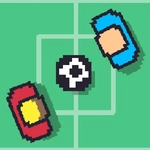
Soccer Pixel looks like it fell out of a 1980s arcade cabinet, but don't let the chunky sprites fool you — there's a surprisingly deep control scheme hiding under that green pitch. You control a pixelated striker (or maybe two, if you rope in a friend) and the whole game hangs on one clever mechanic: acceleration. Press the key harder or longer and your player builds up speed. Tap it lightly and you inch forward. It's not just about smashing the ball; it's about modulating your speed so you arrive at the right moment.
The first time I tried it, I kept overshooting the ball because I was mashing W like it owed me money. Then I realized the trick: hold the key to sprint, release early to brake. The ball physics are bouncy and a little wild — a hard sprint into the ball sends it rocketing, but a gentle nudge can roll it past the keeper. Playing against a friend on the same keyboard is chaos in the best way, with W and Up Arrow fighting over the same striker. On mobile, touch controls feel surprisingly precise once you get used to sliding your thumb for speed.
It's not a deep simulation — there's no offside rule or tactical formations. But as a quick, laugh-out-loud two-player duel, it works. The pixel art is clean and readable, the goals feel earned, and the acceleration mechanic gives every kick a satisfying risk-reward. If you've got five minutes and a friend, this is a great way to settle who's the better pixel footballer. Just be ready for some sore fingers from pressing too hard.
👥How to Play Soccer Pixel
You can control the game in mobil devices by touching screen and you can control the in PC with "W" and "UP ARROW KEY". Besides, the players run fast by accelerating depending on how much you press on control keys.
✨Game Tips
Hold the key longer to build up speed before striking the ball for a harder, more accurate shot.
Release the key early to brake — overshooting is the number one way to lose possession.
On mobile, slide your thumb gradually instead of tapping to control acceleration smoothly.
In two-player mode, communicate with your partner to avoid both chasing the same ball.
Angle your run to meet the ball from the side; it curves into the net more often than a straight hit.
Don't sprint constantly — mix speeds to keep your opponent guessing.
🔧FAQ
Q: Is Soccer Pixel free to play?
A: Yes, Soccer Pixel is completely free to play in your browser with no hidden costs or in-game purchases.
Q: Can I play Soccer Pixel on my phone?
A: Yes, the game supports touch controls on mobile devices. Touch and drag to control your player's speed and direction.
Q: Do I need to download anything to play Soccer Pixel?
A: No, it runs right in your web browser as an HTML5 game. Just open the page and start playing.
Q: Can two people play Soccer Pixel on the same PC?
A: Yes, one player uses the W key and the other uses the Up Arrow key on the same keyboard.
Q: What are the controls for Soccer Pixel?
A: On PC, press W or Up Arrow to move. The longer you hold the key, the faster your player runs. On mobile, touch and slide.
Q: Is there an online multiplayer mode?
A: No, Soccer Pixel is a local two-player game only. You'll need a friend beside you or play solo against the AI.