
Space Bus 3D
Play Count0
Published2022-04-27
Supported DevicesPC + Mobile
CategoryDriving & Racing
Rating★★★★★5.0Rate this game
📝Space Bus 3D Overview
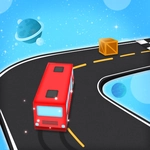
Steer a double-decker through asteroid belts and neon wormholes in Space Bus 3D—one wrong twitch sends passengers flying.
💬What is Space Bus 3D?
I didn't expect a bus in space to feel this tense, but here we are. Space Bus 3D throws you behind the wheel of a clunky interplanetary transit vehicle and then slams the accelerator to the floor. You don't control speed—only left and right steering—so every second is about reading the gap between a spinning satellite and a floating neon billboard. The bus moves with a weird, heavy momentum, like it's full of sleeping tourists who have no idea you just clipped a fuel depot.
The first time I angled a full double-decker through a keyhole-sized gap between two asteroids, I actually leaned in my chair. That's the whole hook: split-second lane changes that feel great when they work and hilarious when they don't. Crash, and the bus disintegrates in a shower of metal and luggage—passengers bounce harmlessly into the void with tiny cartoon screams. You'll restart instantly. You'll tell yourself one more run. Then it's forty minutes later and your thumb is sore from jamming the arrow keys.
It's a hypercasual game through and through: no upgrades, no levels, just a score that climbs until you inevitably understeer into a trash nebula. The 3D visuals are bright and clean enough to read obstacles from the corner of your eye, and the speed ramps up at a pace that keeps you just shy of overwhelmed. If you have five minutes or a boring Zoom call, this is the kind of zero-commitment chaos that'll eat your lunch break without apology.
👥How to Play Space Bus 3D
Left and right keyboard button
✨Game Tips
Tap the keys lightly instead of holding them—the bus swings wide, and overcorrecting is how most runs end.
Focus on the left edge of the obstacle ahead, not the bus itself; your brain will steer through the gap automatically.
The speed increases every 20 seconds or so, so early on stay centered to buy yourself reaction time later.
Don't hug the walls—space lanes are narrow and the bus has a wide hitbox, give yourself a pixel of breathing room.
Use short bursts of key presses to shuffle the bus, which gives finer control than long holds.
🔧FAQ
Q: Is Space Bus 3D free to play?
A: Yes, it's completely free—no hidden charges or paywalls, just open the page and steer.
Q: Can I play Space Bus 3D on my phone?
A: The game uses keyboard controls, so a desktop or laptop works best. Mobile touch isn't supported unless you connect a keyboard.
Q: Do I need to download anything to play Space Bus 3D?
A: No downloads. It runs directly in your web browser as an HTML5 game.
Q: What happens if I crash the bus?
A: The run ends instantly, your score resets, and you can restart with a single button press.
Q: Does Space Bus 3D have levels or upgrades?
A: No levels or upgrades—it's an endless score chaser. The challenge comes from constantly increasing speed and obstacle density.
Q: Why is my bus not turning smoothly?
A: The bus has momentum; give steering inputs a moment to take effect. Tap keys rather than holding them for sharper control.