
Sprocky
Play Count0
Published2022-07-07
Supported DevicesPC + Mobile
CategoryArcade & Classic
Rating★★★★★5.0Rate this game
📝Sprocky Overview
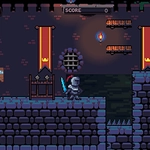
Guide a plucky living sprocket through belt-driven obstacle courses, snapping connections and busting moves to unlock gates.
💬What is Sprocky?
The first time I hit E to dance next to a stuck conveyor belt I felt like an idiot. Then the nearest gear teeth clicked into place and the whole contraption groaned back to life. That's when Sprocky clicked for me: this is not a normal platformer.
You control a round, gear-shaped critter with stubby legs and a surprising amount of grip. A and D roll you left and right, Space bunny-hops you over gaps, and the arrow keys snap you onto compatible hubs scattered through each level. Once you're attached, the dance command (E) rotates your body to push the connected machinery in the right direction. Timing matters more than reflexes—hang on too long and you'll spin into a wall; too short and the belt stalls halfway. Early stages feel like a relaxed puzzle, but by the third or fourth area you're chaining three or four connections mid-air while pistons slam around you.
I kept coming back to one level where a vertical shaft only turns when you connect to a side gear, hop off, dance on a pressure plate, and reconnect before a gate closes. It's the kind of small mechanical logic puzzle that makes you feel clever without needing a tutorial. The gamepad mapping works well too: left stick to move, right bumper to jump, face buttons to connect, and left bumper to dance. Esc pauses any time you need to study the moving parts.
If you like arcade games that mix precise movement with a little bit of mechanical tinkering, Sprocky scratches an itch most runners don't. It's short, snappy, and unapologetically about gears.
👥How to Play Sprocky
Controls
KEYBOARD GAMEPAD
Move A/D Left Stick
Jump Space Right Bumper
Connect Arrow Keys Face Buttons
Dance(!) E Left Bumper
Pause ESC Start
✨Game Tips
Feather A/D to line up your jump; a single missed pixel off a gear is a fall.
Connect with arrow keys only when you see the hub highlight — mid-air mashing won't help.
Dance (E) rotates connected parts, so watch how the machinery stalls before you trigger it.
Pause with Esc before a long chain to map out which gears need to spin first.
On gamepad, keep left bumper under your finger for Dance while you steer with the stick.
🔧FAQ
Q: Is Sprocky free to play?
A: Yes, Sprocky is completely free to play in your browser.
Q: Can I play Sprocky on mobile?
A: The game works best on desktop with keyboard or gamepad; mobile touch support may be limited.
Q: Do I need to download anything to play Sprocky?
A: No download is needed — just open the game page and start playing.
Q: What does the dance move (E) actually do?
A: It rotates your character while connected, which turns nearby gears and machinery.
Q: Can I use a gamepad with Sprocky?
A: Yes, gamepad is supported: left stick to move, right bumper to jump, face buttons to connect, left bumper to dance.
Q: Is Sprocky suitable for younger players?
A: Yes, it has no violence and focuses on family-friendly mechanical puzzles.