
Squid Game Obstacle Runner
Play Count0
Published2022-01-11
Supported DevicesPC + Mobile
CategoryArcade & Classic
Rating★★★★★5.0Rate this game
📝Squid Game Obstacle Runner Overview
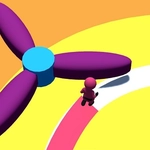
Tap to switch lanes, dodge spinning blades, and survive the glass bridge before the timer hits zero in this deadly Squid Game dash.
💬What is Squid Game Obstacle Runner?
This runner takes the iconic Squid Game trials and turns them into a twitchy lane-switcher. You control a player who automatically sprints forward, and your only job is to click or tap the screen to jump between three lanes. Easy to pick up, brutal to master. The obstacles start simple — a low wall here, a swinging pendulum there — but then the red light green light segments kick in. You'll freeze mid-run, and if you twitch even a pixel forward when the doll turns around, it's over. That's where the real tension lives.
The glass bridge is where I kept losing my cool. Two lanes are safe, one shatters on contact. You have maybe half a second to read the faint crack pattern before you commit. I found myself leaning in, hovering over the mouse, second-guessing every click. The game doesn't punish you for going slow, but the timer does. There's a constant push-pull between caution and speed that gets your heart rate up. Deaths restart the current trial, not the whole game, which keeps frustration manageable but still makes you want to nail the full run.
Visually it's clean and instantly readable, with bold colors and clear silhouettes. No clutter. That matters because you need to react in fractions of a second. On mobile it plays just as tight with touch controls, though I'd recommend a bigger screen for the later stages. The difficulty curve ramps up nicely — once you think you've memorized a pattern, the lanes shift or an extra obstacle gets layered in. It's the kind of game you'll open for two minutes and still be playing twenty minutes later, swearing at the glass bridge every single time.
👥How to Play Squid Game Obstacle Runner
Use mouse, click on screen with mouse or mobile touch and character will run o the respective path!
✨Game Tips
Watch the doll's head movement — a subtle turn means stop immediately, even mid-lane.
Tap the empty space just ahead of your runner, not the lane itself, to avoid overshooting.
On the glass bridge, trust the first two steps of the pattern; the third is often a trap.
Use the edge of the screen to spot incoming obstacles before they fully enter view.
Don't panic-click during red light; a single twitch resets your run faster than any blade.
Learn which obstacles repeat between deaths — the sequence stays consistent within a level.
🔧FAQ
Q: Is Squid Game Obstacle Runner free to play?
A: Yes, it's completely free in your browser with no hidden fees or paywalls.
Q: Can I play Squid Game Obstacle Runner on mobile?
A: Absolutely. Just open the game on your phone and tap the screen to switch lanes.
Q: Do I need to download anything to start playing?
A: No download needed. It runs instantly in any modern browser on desktop or mobile.
Q: What are the controls for Squid Game Obstacle Runner?
A: Click with a mouse or tap the screen to move your character to the corresponding lane.
Q: Why is this game unblocked at school or work?
A: It's hosted on an unblocked games site, so network filters won't block the page.
Q: What happens if I die during a trial?
A: You restart only the current challenge, not the whole run, so you can retry quickly.