
Squid Gamer City Driving Gang
Play Count0
Published2022-01-12
Supported DevicesPC
CategoryDriving & Racing
Rating★★★★★5.0Rate this game
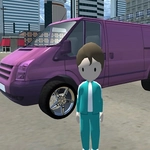
📝Squid Gamer City Driving Gang Overview
Every sidewalk is fair game and every car has your name on it when you hit these streets—just don't expect anyone to follow the rules.
💬What is Squid Gamer City Driving Gang?
The first thing I did was steal the nearest sedan, slam the accelerator, and plow straight through a fruit stand. Nobody even flinched. That's the whole energy here—a city that exists for you to tear through with zero consequences. You've got F to hop in or out of any car, WASD to drive or walk, Space to brake, and Tab to open the menu. It's simple, but the chaos sneaks up on you.
You're not locked into missions from the jump. You can cruise around, swap cars whenever you spot something faster, or just park on a roof if you feel like it. The city has that low-poly 3D charm—think early GTA mixed with a browser game's reckless heart. I kept finding new alleys and ramps that clearly weren't accidental. Some cars feel heavy and sluggish, others zip around corners like they're on rails. That variety made me actually care which ride I grabbed next.
When you're on foot, the same WASD works, and that's when the gang part shows up. You'll see other characters wandering around, and the vibe is more weird than dangerous—though I did get run over by my own abandoned car once. Don't skip Tab; the menu sometimes holds a few surprises that aren't obvious from the first five minutes. This is the kind of game you open for a quick drive and then realize an hour vanished while you were launching off a parking garage ramp.
👥How to Play Squid Gamer City Driving Gang
F to enter in car or exit
Tab to show menu
WASD TO drive car or character
Space to brake in car
And much more fun waiting you in this awesome game, have fun guys.
✨Game Tips
Hold Space early when approaching a turn—the brakes are strong enough to save you from most bad decisions.
Switch cars often; each one handles differently and some have noticeably better top speed and grip.
Use F to bail out of a car just before a crash—you'll take less damage and can sprint to another ride.
Open the menu with Tab periodically; it may reveal controls or options you missed at the start.
Don't ignore walking mode—some alleys and hidden spots only make sense when you're on foot.
Treat curbs and ramps as launch pads; getting airborne is the fastest way to cut across blocks.
🔧FAQ
Q: Is Squid Gamer City Driving Gang free?
A: Yes, it's completely free to play in your browser with no payment required.
Q: Can I play Squid Gamer City Driving Gang on mobile?
A: It works best on desktop with a keyboard, but touchscreen support may vary depending on your device.
Q: Do I need to download anything to play?
A: No downloads or installs are needed—just open the game page and start driving.
Q: What are the controls for Squid Gamer City Driving Gang?
A: Use WASD to move, F to enter or exit cars, Space to brake, and Tab to open the menu.
Q: Is Squid Gamer City Driving Gang unblocked at school?
A: It's designed to run on unblocked game sites, but your school's network may still restrict access.
Q: Can I play with friends in multiplayer?
A: No, this is a single-player experience focused on free-roam driving and exploration.