
Steve AdventureCraft Nether
Play Count0
Published2021-08-10
Supported DevicesPC + Mobile
CategoryAction & Fighting
Rating★★★★★5.0Rate this game
📝Steve AdventureCraft Nether Overview
You spawn on the edge of a crumbling Nether fortress with nothing but a stone pickaxe and a bad feeling.
💬What is Steve AdventureCraft Nether?
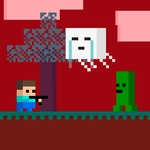
I pressed F expecting to punch a piglin and instead got launched into a lava fall. Lesson learned: F is contextual, and the Nether doesn't care about your reflexes. The game drops you right into a blocky hellscape full of crumbling fortresses, glowing mushrooms, and way too many mobs that want your head. Movement is WASD, and the left mouse button swings whatever tool you've managed to craft. The trick is staying alive long enough to gather netherrack, glowstone dust, and the occasional ancient debris without getting sniped by a ghast.
What surprised me is how much of the classic Minecraft loop survives here. You'll punch trees? No, you'll punch netherrack, craft a basic sword, then immediately regret every choice when a blaze spawns behind you. The crafting menu is simple—drag items into a 3x3 grid—but the resource scarcity keeps you constantly on edge. I found a ruined portal half-buried in soul sand and spent ten minutes mining obsidian while fending off zombified piglins. That tense rhythm of mine, look over your shoulder, mine again is what keeps me coming back.
Don't expect a chill sandbox. AdventureCraft Nether is more like a survival gauntlet with light building mechanics. The Nether fortresses are mazes with hidden chests and spawners that never stop pumping out skeletons. Bring a shield if you can craft one, or just learn to strafe like a maniac. It's rough around the edges—hitboxes feel a little generous, especially on the ghast fireballs—but for a browser game, it nails the claustrophobic dread of the Minecraft Nether without needing to install anything.
👥How to Play Steve AdventureCraft Nether
*WASD + F / Mobile Touch Control
✨Game Tips
Craft a sword before you venture into any fortress—punching blazes with bare fists is a fast ticket to the respawn screen.
Use F on glowing blocks like glowstone or redstone ore to harvest them faster than holding left click.
Always keep an eye on the sky when crossing open lava fields; ghasts spawn silently and their fireballs travel slowly enough to dodge.
Double-tap the right side of the screen on mobile to sprint, which makes kiting zombie piglins much easier.
Build a small enclosed shelter with netherrack blocks as soon as you have a stack of them—mobs can't open doors, but they'll crowd around forever.
🔧FAQ
Q: Is Steve AdventureCraft Nether free to play?
A: Yes, completely free in your browser. No hidden paywalls or premium currency.
Q: Can I play Steve AdventureCraft Nether on mobile?
A: Yes, touch controls are built in. Use the on-screen joystick and buttons, and double-tap the right side to sprint.
Q: Do I need to download anything?
A: No download needed. It runs directly in a modern web browser as HTML5.
Q: What does the F key do?
A: F performs a context action—interacting with objects, harvesting special blocks, or activating switches.
Q: Does my progress save automatically?
A: Yes, the game autosaves your inventory and position locally in your browser. Clearing cache will wipe it.
Q: What's the main goal of the game?
A: Survive the Nether, gather resources, craft better gear, and find a way back through a portal you build yourself.