
TetraBlocks Mosaic
Play Count0
Published2024-02-12
Supported DevicesPC + Mobile
CategoryArcade & Classic
Rating★★★★★5.0Rate this game
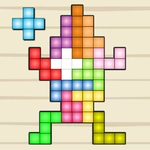
📝TetraBlocks Mosaic Overview
Fit every last block into a glowing mosaic grid and watch the pattern snap together.
💬What is TetraBlocks Mosaic?
First thing I noticed: the blocks don't rotate the way I expected. You drag tetrablocks from the side tray onto a grid, and each piece only locks when its shape matches the gap. That's the whole loop, but difficulty creeps up fast. Early boards feel almost meditative—then you'll hover a stubborn T-shaped block over empty space, flip its orientation twice, and realize you've trapped yourself three moves back.
The mouse or touchpad control is simple but demands clean dragging. You aren't stacking lines like traditional Tetris; instead you complete a flat mosaic pattern that lights up when the final piece settles. I kept returning to failed boards just to watch that reveal, because it's genuinely satisfying. Some solutions leave zero wasted blocks, so placement order matters more than pure shape recognition. If you like spatial puzzles that force you to plan backwards, this one lands.
What keeps it playable for me: there's no pressure clock on most boards. A bad move feels cheap to undo—you can reset the whole grid and rethink the layout without losing anything. It's a game you'll open for a quick five-minute break and then notice half an hour has gone. On a laptop touchpad, I found a slow controlled drag works better than flicking pieces into place, especially for the longer 1x4 blocks. The visuals are clean without being sterile, and the satisfying click when a block locks is just enough feedback.
👥How to Play TetraBlocks Mosaic
Use a mouse or touchpad to move and fix the tetrablocks in the grid.
✨Game Tips
- Start from the corners and outer edges; center gaps are easier to fill later.
- Hover a block over the grid before dragging to see exactly which cells it will cover.
- If a piece won't lock, check for single-cell gaps hidden behind its shape.
- Don't hoard the long straight tetromino—using it early opens more flexible spaces.
- Use the reset button instead of undoing piece by piece when a board gets messy.
- Work backwards from the last few empty cells to pick your next block.
🔧FAQ
Q: Is TetraBlocks Mosaic free to play?
A: Yes, it's completely free with no download or account needed.
Q: Can I play TetraBlocks Mosaic on my phone?
A: It works on phones and tablets via browser, though a mouse or touchpad feels more precise.
Q: Do I need to download anything to start?
A: No downloads. The game runs directly in your web browser as HTML5.
Q: What kind of puzzle is TetraBlocks Mosaic?
A: It's a spatial block-fitting game where you arrange tetromino pieces to complete a flat mosaic grid.
Q: Is TetraBlocks Mosaic unblocked at school?
A: Usually yes, since it's part of unblocked games sites and doesn't require special access.
Q: Does the game have a timer or moves limit?
A: No strict timer on most boards; you can take your time and experiment with placement.