
The Festival Of Colors Jigsaw
Play Count0
Published2020-09-17
Supported DevicesPC
CategoryPuzzle & Thinking
Rating★★★★★5.0Rate this game
📝The Festival Of Colors Jigsaw Overview
Drag and drop each vibrant shard into place as a festival bursts across your screen—slow down, breathe, and let the colors align.
💬What is The Festival Of Colors Jigsaw?
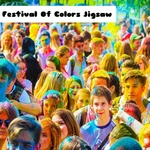
If you've ever walked through a color run or seen photos of Holi, you'll recognize the energy here. The image on the board isn't just a random pattern—it's a crowd mid-throw, powder exploding in pink and yellow and green. Pieces sit in a messy pile at the bottom of the screen, and you drag them one by one onto a faint outline. When a piece locks into place, there's a tiny visual snap, not a loud sound, just enough to tell you you're right. I found myself spending way too long on a patch of orange dust, convinced two nearly identical pieces were swapped. They weren't, but that's the fun of it.
There's no timer, no move counter, no way to lose. You can walk away, come back, and pick up where you left off—if your browser keeps the tab open. That makes it ideal for lunch breaks or when you're waiting on something. The drag-and-drop feels smooth even on a trackpad, and you can work on edges first or dump pieces into rough color groups. I'd recommend starting with corners, because every other good decision follows from that.
The second puzzle (if you finish the first) switches to a slightly different composition, but the color overload never stops. It's not a game for adrenaline junkies, and it won't test your reflexes. It's just a quiet little jigsaw that smells like gulal and sounds like laughter, if your imagination is willing. I played it twice back-to-back and only stopped because my coffee went cold.
👥How to Play The Festival Of Colors Jigsaw
Mouse Drag and Drop
✨Game Tips
Start with edges and corners—flat sides are the only reliable giveaway.
Sort pieces into rough color piles before placing; the pinks and oranges can blur together.
If a piece won't lock, check the board from a step back; you may have the right shape but wrong adjacent spot.
Drag slowly from the pile—fast flings make pieces overlap and hide the one you actually need.
Use the preview image to anchor faces or a distinct color patch early; they're your landmarks.
Leave the most uniform color zones (like a clear sky or solid background) for last.
🔧FAQ
Q: Is The Festival Of Colors Jigsaw free to play?
A: Yes, it's completely free in your browser—no hidden fees or subscriptions.
Q: Can I play The Festival Of Colors Jigsaw on my phone?
A: Yes, the HTML5 version works on mobile browsers and tablets using touch drag.
Q: Do I need to download anything to start?
A: No downloads or plugins are required. Just open the game page and start dragging.
Q: How many difficulty levels does it have?
A: Most jigsaw versions for this title let you choose piece counts like 16, 36, or 64.
Q: What if I can't find a piece that fits?
A: Look at the edge first—usually you missed a flat-sided piece hiding under others.
Q: Does the game save my progress automatically?
A: No, it won't save if you close the tab, so finish a puzzle in one sitting if you can.