
Traffic Parking
Play Count0
Published2025-05-06
Supported DevicesPC + Mobile
CategoryAction & Fighting
Rating★★★★★5.0Rate this game
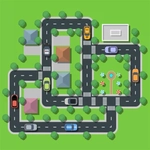
📝Traffic Parking Overview
Can you squeeze into that gap without a scratch? Tap the car, trace its path, then send it rolling before the traffic piles up.
💬What is Traffic Parking?
Most parking games drop you behind the wheel and let you feel the crunch. Traffic Parking flips that: you're a traffic controller with a god's-eye view of a cramped lot. Each car sits frozen until you tap it, a dotted line unfurls showing the exact path it'll take, and a second tap commits. The tension comes from timing—cars creep in from the edges, and if two paths intersect, you're watching metal kiss metal.
I lost count of how many times I thought I had a route planned, only to see a fresh car slide in and ruin the whole chain. The puzzle isn't just where to park; it's sequencing when to release each car so they don't collide mid-turn. Some lots are tiny, packed with four cars and one exit. Others sprawl with moving traffic that forces you to wait for gaps. The path preview is both a blessing and a trap: it shows exactly where the car will go, but you still have to judge whether that space will still be empty when the car actually gets there. Level 12 threw me a curve: a bus that takes ages to turn, plus a motorcycle that zips across. Had to release the bus first, then time the bike to shoot the gap between two sedans. Felt like a tiny traffic conductor.
It's the kind of game that feels simple until level 8, then you're muttering at your screen. No timer, no lives—just your pride and a growing pile of scrap metal. The art is clean and uncluttered: flat colors, chunky car sprites, and roads that read clearly even on a small phone screen. If you like spatial puzzles dressed up as parking sims, this one will eat your lunch break.
👥How to Play Traffic Parking
Touch the car to see the car’s path, touch again to drive the car.
✨Game Tips
Tap once to preview a car's route, but check for incoming traffic before you commit—a second tap is final.
Release slower vehicles like buses and trucks earlier; they take longer to clear intersections.
Watch the edges of the screen for cars entering the lot; they'll mess up your plan mid-chain.
Some levels let you wait—if a gap is forming, hold your tap and let traffic clear first.
Chain exits together so one car's departure opens a path for the next car's route.
Don't hesitate to restart if your first car choice looks wrong; sometimes the layout is order-dependent.
🔧FAQ
Q: Is Traffic Parking free to play?
A: Yes, the game is completely free in your browser—no payment or account required.
Q: Can I play Traffic Parking on my phone?
A: Absolutely. It works on mobile browsers with touch controls; tap to select and drive.
Q: Do I need to download or install anything?
A: No downloads. It runs directly in your web browser as an HTML5 game.
Q: What happens if two cars crash?
A: The level fails and you'll need to restart, so plan your moves carefully.
Q: Are there different levels or just one parking lot?
A: The game includes multiple levels with increasing traffic and tighter spaces.
Q: Can I play this game at school or work?
A: Yes, since it's unblocked and browser-based, you can play wherever you have internet.