
Truck Simulator Construction
Play Count0
Published2024-09-16
Supported DevicesPC
CategoryAction & Fighting
Rating★★★★★5.0Rate this game
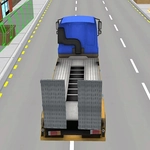
📝Truck Simulator Construction Overview
Climb into a heavy construction truck and navigate muddy haul roads, steep grades, and tight site corners — one careless turn and your cargo's on the ground.
💬What is Truck Simulator Construction?
I wasn't expecting much from a browser truck game, but the first time I sent a loaded dump truck over a raised section of dirt and felt the back end start to slide, I was hooked. Truck Simulator Construction drops you behind the wheel of heavy machinery on a working site. Your job is simple on paper: pick up material, haul it to the drop-off point, don't wreck the truck. In practice, the slopes, mud patches, and awkward narrow paths turn every run into a balancing act.
That's the whole loop, but the physics give it weight. Hit a pothole too fast and your cargo shifts. Take a sharp corner without slowing and the trailer drags you sideways. I kept catching myself leaning forward in my chair, as if that would keep the truck upright. The controls are WASD only, which sounds limiting, but it's exactly what the game needs — you're not fighting a UI, just the terrain. There's a mini-map or marker showing where to go, and the truck has a satisfying groan when it strains up an incline. You'll learn to read the ground: dark patches mean mud, loose gravel looks lighter, and the edge of the site is always closer than it appears.
If you enjoy games where failure is your fault and you can see exactly what you did wrong, this one scratches that itch. It's not a full-blown sim with gear shifts and hydraulics, but it's not a mindless arcade racer either. You'll need patience and a steady hand, especially on the later runs where the route gets longer and the loads heavier. I'd recommend it for a quick 15-minute session when you want to feel competent behind a wheel without booting up a 40GB simulator.
👥How to Play Truck Simulator Construction
WASD - drive
✨Game Tips
Feather the W key on muddy climbs instead of flooring it — spinning tires will slide you backward.
Brake hard before the crest of a hill so the load doesn't bounce over the top.
Use S to reverse in short bursts when lining up with the loading zone; the camera won't show your rear bumper.
Watch your speed through the narrow gate near the site office — clipping the post will cost you a run.
If the trailer starts to jackknife, let off the gas and steer gently into the slide.
Take wider turns than you think you need; the back wheels cut inside.
🔧FAQ
Q: Is Truck Simulator Construction free to play?
A: Yes, it's completely free in your browser with no download needed.
Q: Can I play Truck Simulator Construction on mobile?
A: It's built for desktop keyboards, but touch may work; use a controller or monitor if on mobile.
Q: Do I need to download anything to play?
A: No downloads, no installs — just open the page and play.
Q: What are the controls for Truck Simulator Construction?
A: WASD keys drive the truck; A and D steer, W accelerates, S brakes/reverses.
Q: Does the game save my progress?
A: Progress isn't saved between sessions, so complete a run in one sitting.
Q: Why does my truck keep tipping over?
A: Slow down on uneven ground and avoid sharp turns at speed; balance your load.