
Unblock Me Now
Play Count0
Published2021-09-20
Supported DevicesPC + Mobile
CategoryArcade & Classic
Rating★★★★★5.0Rate this game
📝Unblock Me Now Overview
Slide the jumbled wooden blocks around until that one red piece finally has a clear path to the exit — your brain will thank you for the workout.
💬What is Unblock Me Now?
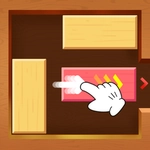
Unblock Me Now takes the timeless sliding-block formula and serves it up without any frills. You've got a board packed with wooden planks of varying lengths, all jammed together, and one red block that needs to reach the opening on the right. Drag any piece horizontally or vertically along its axis — but they can't rotate, and they can't pass through each other. That's the whole rule set. The simplicity is deceptive, because within three moves you'll realize you've trapped yourself and need to backtrack. I've lost count of how many times I swore the solution was obvious, then spent two minutes undoing my own mess.
The early levels lull you into confidence. Short pieces, lots of space, maybe five moves to victory. Then the board starts filling up, and suddenly that red block is walled in by a tangle of long planks that only move one or two spaces total. A trick I learned the hard way: don't just focus on the red block's immediate path. Sometimes you need to shift a totally unrelated plank on the other side of the board to free up a single empty square that lets everything else slide. Once you see it, the whole puzzle clicks, but until then it's a lovely kind of frustration.
What keeps me coming back is how quick it is. No timers, no move counters, no pressure — just you and a wooden puzzle. Each level is solvable in under a minute once you spot the pattern, which makes it perfect for a five-minute break. The drag controls feel responsive whether you're on a mouse or a touchscreen, and there's no penalty for experimenting. Reset the board as many times as you need. The only thing you'll lose is your stubbornness.
👥How to Play Unblock Me Now
Touch or click woo and drag to move
✨Game Tips
Look for the longest plank blocking the exit; moving it even one square can change everything.
Work backwards from the exit — which piece needs to move last before the red block escapes?
Don't be afraid to reset the board. A fresh start clears mental clutter fast.
Use empty spaces as storage: move a piece into a gap to create room for another.
If you're stuck, try moving a piece that seems far from the goal; it often unlocks the path.
On mobile, drag slowly to avoid sliding the wrong block by accident.
🔧FAQ
Q: Is Unblock Me Now free to play?
A: Yes, it's completely free with no hidden fees. Just open and start dragging blocks.
Q: Can I play Unblock Me Now on my phone?
A: Absolutely. The touch controls work great on mobile browsers, no app needed.
Q: Do I need to download anything to play?
A: No downloads. It runs right in your browser as an HTML5 game.
Q: How do I reset a level if I get stuck?
A: Look for a reset button on the screen or simply refresh the page to start over.
Q: Does Unblock Me Now track my moves or time?
A: No, there's no timer or move counter. You can take as long as you like.
Q: Is Unblock Me Now suitable for kids?
A: Yes, it's a family-friendly puzzle game that helps with logical thinking.