
Wolfoo Supermarket Sort
Play Count0
Published2026-07-22
Supported DevicesPC + Mobile
CategoryPuzzle & Thinking
Rating★★★★★5.0Rate this game
📝Wolfoo Supermarket Sort Overview
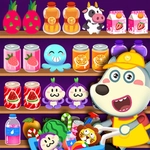
Clear Wolfoo's messy shelves by dragging groceries into empty slots and stacking three of a kind — one wrong placement and the aisle fills fast.
💬What is Wolfoo Supermarket Sort?
I didn't expect a supermarket sorting puzzle to hook me, but here I am. Wolfoo Supermarket Sort is a sorting-puzzle spin on the usual match-3 format. You drag groceries onto shelves, each cell holds up to three identical items. Once you get three eggs, three milk cartons, or three tomatoes stacked in one spot, they pop and free up space. Sounds simple. But the shelves are a jumbled mess of overlapping orders. Place a watermelon next to a banana and you'll soon wish you hadn't — because every wrong item eats a slot, and slots are scarce.
Think of it like arranging a fridge with extra steps. You get Hint, Undo, and Shuffle buttons, but I found myself relying on Undo more than I care to admit. The real trick is looking ahead: before you drag an item, check if there's already a pair of that item peeking out somewhere else. The game doesn't rush you, but the limited cell count creates this low-key panic that keeps me clicking 'one more level.'
Wolfoo himself is there for kid-friendly charm, but the puzzle underneath is legitimately satisfying for all ages. No timers, no lives, just spatial sorting with a supermarket skin. If you enjoy supermarket sweep-style chaos with gentle brainwork, this is the corner of the internet for you.
👥How to Play Wolfoo Supermarket Sort
Mouse (desktop) or touch (mobile). Drag a grocery item to an empty spot on the shelves; get 3 matching items into one cell to clear it. Use the Hint, Undo and Shuffle buttons if you get stuck.
✨Game Tips
- Always scan the shelves for an existing pair before dragging a new item.
- Use Undo the moment you realize a slot is wrong — don't wait.
- Shuffle only as a last resort; it rearranges everything and can make matches harder to spot.
- Keep at least one empty cell open for flexibility, even if it means delaying a match.
- Tap the Hint button when your eyes glaze over, but don't rely on it.
- Prioritize clearing items that are blocking multiple potential matches.
🔧FAQ
Q: Is Wolfoo Supermarket Sort free to play?
A: Yes, it's completely free on our site. No paywalls or hidden charges.
Q: Can I play Wolfoo Supermarket Sort on mobile?
A: Yes, touch controls work perfectly on phones and tablets.
Q: Do I need to download anything to play Wolfoo Supermarket Sort?
A: No download needed. It runs in your browser.
Q: What are the controls for Wolfoo Supermarket Sort?
A: Drag items with mouse or finger. Use Hint, Undo, Shuffle buttons on screen.
Q: Is Wolfoo Supermarket Sort suitable for kids?
A: Yes, it's very kid-friendly with bright cartoon groceries and no violence.
Q: What if I get stuck in Wolfoo Supermarket Sort?
A: Use Shuffle or Hint buttons. If still stuck, restart the level.