
Zombie Survival Gun 3D
Play Count0
Published2023-03-10
Supported DevicesPC + Mobile
CategoryAction & Fighting
Rating★★★★★5.0Rate this game
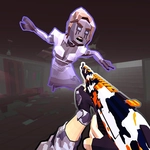
📝Zombie Survival Gun 3D Overview
The street is crawling with the undead, your ammo counter is blinking red, and the only thing between you and a bite is one steady trigger finger.
💬What is Zombie Survival Gun 3D?
I'll be honest: I loaded up Zombie Survival Gun 3D expecting another cheap cash-grab zombie shooter, but five minutes in I was crouched behind a rusted car, counting bullets and flinching every time a groan came from behind me. The core loop is simple—zombies shamble toward you from every alley and doorway, and you have to drop them before they close the distance. Headshots are the only reliable way to save ammo, which matters more than you'd think.
That right-click scope is your best friend. It's not just a zoom; it steadies your aim enough that you can actually track a sprinting walker instead of spraying wildly. I lost count of how many times I used the Tab menu mid-fight to check my remaining magazines, only to realize I'd burned through two of them clearing a single wave. The 3D environments have enough clutter—dumpsters, abandoned cars, low walls—that positioning becomes a real part of survival. You can't just stand in the open and shoot; you have to funnel the horde into narrow gaps or back yourself into a corner with good sightlines.
If there's one thing I'd change, it's the occasional unfair spawn where a zombie appears right behind you without much warning. But that also keeps the tension high—turn your back on a doorway and you'll learn quickly. For a browser game, the gunplay feels surprisingly weighty, and each kill gives just enough of that dopamine hit to keep you clicking. Bring headphones if you can; the ambient growls and distant moans genuinely had me checking my six.
👥How to Play Zombie Survival Gun 3D
Use mouse for aiming
Left click for shooting
Right Click For Scope
Tab For Menu
✨Game Tips
Headshots are the only ammo-efficient way to kill—body shots waste rounds and still leave the walker coming.
Use the right-click scope to steady your aim before firing, especially at medium range.
Check the Tab menu between waves to see how many magazines you have left, not just bullets in the current one.
Stay near walls or corners so zombies can't surround you; back yourself into a spot with only one approach.
Learn the spawn patterns—some alleys always have a crawler waiting, so pre-aim before you round the corner.
If a zombie gets too close, don't waste time scoping; hip-fire and backpedal to create distance.
🔧FAQ
Q: Is Zombie Survival Gun 3D free to play?
A: Yes, it's completely free in your browser—no download or payment needed.
Q: Can I play Zombie Survival Gun 3D on my phone?
A: The game is designed for mouse and keyboard, so a desktop or laptop is recommended. Mobile touch controls aren't supported.
Q: Do I need to download anything to start playing?
A: No downloads. It runs in your web browser using HTML5, so just click and play.
Q: What are the controls for Zombie Survival Gun 3D?
A: Use mouse to aim, left click to shoot, right click for scope, and press Tab to open the menu.
Q: Does the game have multiple levels or waves?
A: It features wave-based survival—each wave brings more zombies with different speeds and health.
Q: Can I pause or restart the game easily?
A: Press Tab to open the menu where you can pause, restart, or adjust settings during a run.