
155 Police Dragon Panzer Drive
Play Count0
Published2023-05-15
Supported DevicesPC
CategoryAdventure & RPG
Rating★★★★★5.0Rate this game
📝155 Police Dragon Panzer Drive Overview
Tear through city streets in a dragon-styled armored police vehicle with sirens wailing and a panzer cannon at your command.
💬What is 155 Police Dragon Panzer Drive?
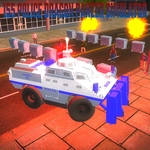
I wasn't sure what to expect from a game literally called 155 Police Dragon Panzer Drive, but the moment I hit the gas and heard a siren that sounded like a dragon gargling a kazoo, I got it. This is pure, unapologetic vehicular chaos. You're behind the wheel of a massive police vehicle that's been crossed with a panzer tank and given a dragon-themed paint job that would make a carnival jealous. The streets are your playground — no missions, no timers, just you, a ridiculous armored beast, and a city full of corners to cut.
The controls are surprisingly deep for a free browser game. WASD drives, Space is your handbrake, and C cycles through camera angles — including a cinematic chase cam that makes every near-miss feel like a Michael Bay cut. But the real gem is the siren system. Alpha1 through Alpha5 give you five different siren tones, from a classic European wail to something that sounds like a wounded synth. Alpha6 triggers a police announcement — I'm not sure what it says, but it's garbled and authoritative and I kept spamming it while drifting through intersections. There's even a right turn signal on E, which feels absurdly polite given the vehicle's cannon-like front bumper.
The physics are arcade-lite: heavy enough to feel weighty but forgiving enough that you can handbrake-slide around corners without immediately barrel-rolling. The dragon panzer itself is a treat to look at — spiked armor, glowing eyes, and a paint job that shifts colors depending on the angle. If you're the type who enjoys just driving around with no objective, or you want a quick five-minute stress reliever where you can honk sirens and announce nonsense to an empty city, this one's a weird little gem.
👥How to Play 155 Police Dragon Panzer Drive
Pause: P
Vehicle Camera Change: C
Vehicle Control: W-A-S-D
Vehicle Handbrake: Space
Vehicle Right Signal: E
Vehicle Siren Lamp: H
Siren1: Alpha1
Siren2: Alpha2
Siren3: Alpha3
Siren4: Alpha4
Siren5: Alpha5
Announcement1: Alpha6
✨Game Tips
Use the handbrake (Space) for tight corners — tap it lightly to initiate a drift without losing all your speed.
Cycle through Alpha1 to Alpha5 to find a siren that matches your chaos level; Alpha5 is the most obnoxious in a good way.
Switch to cinematic camera (C) before attempting any stunts — it makes the dragon panzer look twice as cool.
Don't sleep on the right turn signal (E); it's useless but hilariously polite when you're driving a tank through a red light.
The game has no damage model, so feel free to launch off curbs and guardrails — the dragon panzer will shrug it off.
🔧FAQ
Q: Is 155 Police Dragon Panzer Drive free to play?
A: Yes, it's completely free to play in your browser — no hidden fees or premium unlocks.
Q: Can I play 155 Police Dragon Panzer Drive on my phone?
A: The game is designed for keyboard controls, so a desktop or laptop with a keyboard is recommended for the best experience.
Q: Do I need to download or install anything to play?
A: No downloads needed. It runs directly in your web browser using HTML5 technology.
Q: What are the siren and announcement controls?
A: Press Alpha1 through Alpha5 for different sirens, and Alpha6 for a police announcement. The H key toggles the siren lamp.
Q: How do I change the camera view?
A: Press C to cycle through different camera angles, including a close chase cam and a wider cinematic view.
Q: Can I pause the game?
A: Yes, press P to pause the action anytime.