
3D Cars
Play Count0
Published2020-01-28
Supported DevicesPC
CategoryAdventure & RPG
Rating★★★★★5.0Rate this game
📝3D Cars Overview
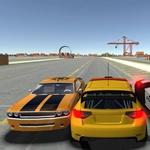
Slide behind the wheel and tear through a low-poly city where every corner hides a new route to shave seconds off your best time.
💬What is 3D Cars?
The first thing you’ll notice is how light the steering feels. Tap W and the car rolls forward with a lazy rumble, but hold it too long and you’re scraping a guardrail. That’s the whole trick — this isn’t a sim, it’s a toy car with a gas pedal and no brakes unless you count slamming S and praying. I spent a good ten minutes just doing donuts in the middle of an intersection because the handbrake (spacebar? I mashed everything) never quite does what you expect.
There’s no mission marker, no timer, no traffic to dodge. Just you, a few blocks of oddly familiar low-poly buildings, and the occasional ramp that launches you into a physics jank-fest. I found a narrow alley behind the row of shops that cuts the main loop time in half — getting through it without clipping a dumpster is the real challenge. The camera sits behind the car at a slight angle, which makes judging gaps tricky until you learn to trust the shadow under the wheels.
Replay value is whatever you make of it. I kept coming back to see how fast I could lap the block, or whether the car could survive a jump off the construction site ramp. It’s the kind of game you open during a boring class, promise yourself five minutes, and then suddenly the bell rings. Escape quits to menu instantly, which is a mercy when you’ve wedged the car into a corner where the only view is inside a brick wall.
👥How to Play 3D Cars
WASD to control car
Escape/tab to quit to main menu
✨Game Tips
Let off W before sharp turns and pivot with A/D to avoid fishtailing into walls
Use Escape to reset to the main menu if you flip the car or get stuck
Try reversing into a drift using S then quickly tapping W to spin the car around tight corners
Explore side streets and behind buildings — hidden ramps and cut-throughs are everywhere
Feather the throttle instead of holding W constantly, especially when you’re near top speed
🔧FAQ
Q: Is 3D Cars free to play?
A: Yes, it’s completely free in your browser with no hidden paywalls.
Q: Can I play 3D Cars on mobile?
A: The game uses WASD controls, so it’s designed for desktop keyboards. Mobile won’t work well.
Q: Do I need to download anything?
A: No download needed. It runs in any modern browser with HTML5.
Q: What are the controls?
A: W to accelerate, A and D to steer left and right, S to reverse. Escape or Tab returns to the main menu.
Q: Is there a goal or race?
A: No formal goal. It’s a sandbox driving toy — make your own laps, stunts, or explore the map.
Q: Can I change the car or camera?
A: The game usually offers only one car and a fixed third-person camera. Check the menu for possible options.