
3D Maze Control
Play Count0
Published2026-01-16
Supported DevicesPC + Mobile
CategoryAdventure & RPG
Rating★★★★★5.0Rate this game
📝3D Maze Control Overview
Tilt the entire board with your mouse and watch gravity do the rest—every twitch sends the ball careening toward a dead end.
💬What is 3D Maze Control?
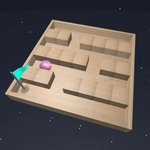
3D Maze Control is the kind of game that tricks you into thinking it's simple. You get a wooden board suspended in space, a steel ball resting in a groove, and a hole somewhere on the far side. Rotate the board with your mouse or finger, tilt it just enough, and the ball rolls. Sounds easy, right? Then you hit the first lip, the ball hops, and suddenly you're chasing it across a corner you didn't see coming. I've sent that ball flying off the edge more times than I care to admit.
The controls are what make it tick. Your mouse position directly controls rotation speed and direction—there's no button to press, no fancy gestures. It's just you and the angle. What caught me off guard was how much fine motor control it demands. A half-degree too far and the ball picks up momentum, clips a wall, and ricochets into the void. The satisfying part? When you finally thread through a narrow corridor, pause, breathe, and tilt the board just a hair to let gravity pull the ball into the goal. That moment feels earned.
It's not a long game. You can finish most levels in a few minutes, but some later boards have moving platforms and drop-offs that'll test your patience. No lives, no score penalties—just you, the maze, and a reset button that's seen better days.
👥How to Play 3D Maze Control
Use your mouse or tap the screen to rotate the board.
✨Game Tips
Keep your mouse movements tiny—overcorrecting sends the ball flying off in seconds.
Pause at the start of each level to map out the path before you commit to a tilt.
If the ball starts bouncing, stop moving the mouse entirely and let it settle.
Use the edges of the board as brakes; a gentle rub against a wall can kill momentum.
Don't chase the ball with the cursor—let the board angle do the work.
On levels with moving parts, time your rotations to match the platform's rhythm.
🔧FAQ
Q: Is 3D Maze Control free to play?
A: Yes, it's completely free in your browser. No hidden fees or paywalls.
Q: Do I need to download anything?
A: No downloads required. It runs on HTML5 in any modern browser.
Q: Can I play 3D Maze Control on my phone?
A: Yes, touch controls work well. Tap and drag to rotate the board.
Q: What happens if the ball falls off the board?
A: The level resets instantly. You can try again as many times as you like.
Q: Is there a time limit or score?
A: No timer or scoring. Focus on getting the ball to the goal hole.
Q: How do I control the rotation speed?
A: Mouse or touch movement directly sets rotation. Small, steady moves give better control.