
Asmr Slicing
Play Count0
Published2021-01-06
Supported DevicesPC
CategoryAdventure & RPG
Rating★★★★★5.0Rate this game
📝Asmr Slicing Overview
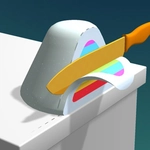
Slide your finger across the screen to slice through oddly satisfying 3D objects while the gentle sounds and smooth visuals keep you oddly relaxed.
💬What is Asmr Slicing?
I didn't think I'd get hooked on slicing digital bars of soap, but here we are. Asmr Slicing throws a rotating 3D object in front of you—sometimes a stack of soft cubes, other times a weird foamy cylinder—and you just swipe. The cut feels impossibly smooth, like a hot knife through butter, and the sound that follows is the real payoff. That soft, crumbly *shhhhk* hits some primal part of my brain that wants everything in life to be half as satisfying.
You don't need lightning reflexes or complex combos. Just slide, listen, repeat. The pace is deliberately slow and meditative, perfect for when you've got five minutes and a fried attention span. I kept catching myself holding my breath mid-slice on a perfect cube of jelly, watching the two halves separate with zero resistance. There's no timer, no fail state, no annoying pop-ups—just you, the object, and the cut.
Each level brings a new shape or material, and the physics engine does the heavy lifting to make every slice look tactile. It's the kind of game that sneaks up on you: you open it to kill time, then realize you've been swiping through virtual kinetic sand for twenty minutes. If you like those oddly satisfying compilation videos but want to control the chaos yourself, this scratches that itch perfectly.
👥How to Play Asmr Slicing
slide to slice
✨Game Tips
Slow, deliberate swipes give cleaner cuts and more satisfying sound pops.
Try slicing the object exactly in half—the two pieces fall apart with a heavier, crunchier effect.
Don't rush through levels; the audio changes slightly based on where you cut, so experiment.
Rotate the object mentally before swiping to find the thinnest or thickest axis for variety.
Use a stylus or your fingertip, not your whole hand, for tighter control on small objects.
If the object doesn't split cleanly, cut again at a 90-degree angle to create smaller chunks with different sounds.
🔧FAQ
Q: Is Asmr Slicing free to play?
A: Yes, it's completely free with no paywalls or in-game purchases.
Q: Can I play Asmr Slicing on my phone or tablet?
A: Absolutely, it works on any touchscreen device with a modern browser.
Q: Do I need to download anything to play Asmr Slicing?
A: No downloads needed—just open the page and start slicing instantly.
Q: What if the game doesn't load on my computer?
A: Try refreshing the page or switching to Chrome, Firefox, or Edge.
Q: Is Asmr Slicing safe for kids?
A: Yes, there's no violence, gore, or inappropriate content—just relaxing object slicing.
Q: How do I restart a level if I want to slice differently?
A: Usually a new object loads automatically, or you can refresh the page for a fresh start.