
Betweenmarine
Play Count0
Published2025-07-23
Supported DevicesPC + Mobile
CategoryAdventure & RPG
Rating★★★★★5.0Rate this game
📝Betweenmarine Overview
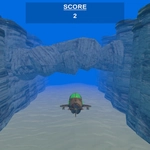
Steer a tiny submarine through tight underwater caves without scraping the walls—one wrong move and you're fish food.
💬What is Betweenmarine?
Imagine a submarine that handles like a bar of soap in a bathtub—slick, twitchy, and ready to slide into whatever you're trying to avoid. That's basically Betweenmarine. You thread a stubby little sub through cramped underwater corridors, past barnacle-covered rocks and jagged metal beams, with no weapons or gadgets to bail you out. The first time I clipped a wall I actually flinched; the collision sound hits harder than it should.
Movement is as simple as it gets: WASD or arrow keys on desktop, or drag your finger on a touchscreen. No throttle, no dive controls, no sonar pings. Just forward motion and direction. That might sound thin, but the level design turns it into a proper white-knuckle run. There's one section—maybe three screens in—where you have to squeeze between two curved pipes that look like they're definitely too close together. I died six times before realizing you need to approach off-center and let the sub's nose drift through the gap sideways. That's the kind of tiny, satisfying trick the game keeps throwing at you.
It's not going to replace a submarine sim or a deep adventure. It's an arcade-ish obstacle course that knows exactly what it wants: quick deaths, instant restarts, and that 'just one more try' pull. On mobile it plays decently with a thumb slide, though I'd take a keyboard if you're aiming for clean runs on the tighter choke points. If you're the type who likes a little tension in your steering, this one's easy to pick up and hard to put down.
👥How to Play Betweenmarine
Simply use your finger to guide the submarine with your touchscreen or use W, A, S and D slash the arrow keys.
✨Game Tips
Tap or press in short pulses instead of holding down; the sub keeps drifting, so overshooting is common.
Approach narrow gaps at a slight angle rather than dead center—side entry gives you more room.
On mobile, drag from the sub's position, not the screen edge, for finer control.
Memorize the first few turns so you can attack them faster on each retry.
Don't panic-spam directions when you scrape; one clean correction is better than three jerky ones.
Use arrow keys over WASD if your keyboard has ghosting with multiple keys.
🔧FAQ
Q: Is Betweenmarine free to play?
A: Yes, it's a free HTML5 game you can play in any modern browser without paying or signing up.
Q: Can I play Betweenmarine on my phone?
A: Absolutely. Touch controls let you drag to steer, so it works on most mobile browsers and tablets.
Q: Do I need to download anything to run Betweenmarine?
A: No downloads or installs. Just open the game page and it loads instantly.
Q: What are the controls for Betweenmarine?
A: Use WASD or arrow keys on a keyboard, or touch and drag on a touchscreen to guide the submarine.
Q: Is Betweenmarine unblocked for school or work?
A: It's an unblocked browser game, so it usually works on networks that don't block game sites.
Q: Does Betweenmarine save my progress?
A: Progress isn't saved between sessions. It's a quick arcade-style run, so you start fresh each time.