
BMW City 2
Play Count0
Published2022-06-30
Supported DevicesPC
CategoryAdventure & RPG
Rating★★★★★5.0Rate this game
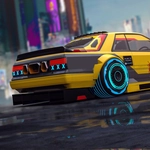
📝BMW City 2 Overview
Slide behind the wheel, mash the throttle, and turn a quiet city grid into your personal playground.
💬What is BMW City 2?
I loaded up BMW City 2 expecting a quick time-killer and ended up losing my afternoon to it. The city is wide open from the start — no locked areas, no forced tutorials, just you and a seriously responsive sports car. The moment you hit the first long straightaway and watch the speed blur the buildings, you get why it's called an adventure. There's something weirdly satisfying about clipping a curb at 90 mph, catching air, and landing clean on a side street.
What sets it apart from other free-roam driving games is how the car actually feels. Braking too late into a corner will punish you, but feather the throttle and you can hold a drift through intersections like a stunt driver. I kept finding little details: a ramp hidden behind a gas station, a narrow alley that dumps you onto a rooftop parking lot, a loop around the waterfront that's perfect for top-speed runs. The minimap helps, but half the fun is ignoring it and seeing where the road takes you.
It's not a sim, so don't expect tire wear or traffic jams. What you get is a sandbox with a BMW badge, tight enough controls to make stunts feel earned, and a city that rewards curiosity. If you're the kind of player who just wants to drive with no scoreboard breathing down your neck, this is a solid pick. I came for the car, stayed for the random ramps.
👥How to Play BMW City 2
Keyboard Controls
✨Game Tips
Use the handbrake for tight turns — tap it mid-corner to rotate the car without losing too much speed.
Ignore the minimap at first; random streets often hide collectibles or ramps.
Keep an eye out for elevated platforms — they usually mark stunt bonuses or shortcuts.
Feather the throttle instead of holding it down; smoother inputs keep the car stable on landings.
Don't brake in the air — reset your wheels straight before landing to avoid spinning out.
🔧FAQ
Q: Is BMW City 2 free to play?
A: Yes, it's completely free in your browser. No payment or subscription needed.
Q: Can I play BMW City 2 on mobile?
A: It runs on HTML5, so most modern mobile browsers support it. Touch controls may vary.
Q: Do I need to download anything to play?
A: No download required. Just open the game page and start driving.
Q: What are the keyboard controls?
A: Use arrow keys or WASD to drive, space for handbrake, and R to reset the car if flipped.
Q: Is there a goal or mission in BMW City 2?
A: It's free-roam adventure, so you explore, find shortcuts, and set your own objectives.
Q: Does BMW City 2 have multiplayer?
A: No, this is a single-player experience focused on open-city driving.