
Brutal Zombies
Play Count0
Published2020-10-15
Supported DevicesPC
CategoryAdventure & RPG
Rating★★★★★5.0Rate this game
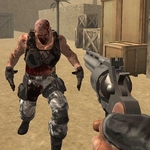
📝Brutal Zombies Overview
Grab whatever fires and keep moving through the ruined streets, because the shambling horde doesn't care about your plans or your ammo count.
💬What is Brutal Zombies?
Brutal Zombies drops you into a grimy 3D world where the undead aren't just obstacles—they're a constant, shuffling pressure. You move with WASD, aim with the mouse, and pull the trigger with left click. The first thing I noticed wasn't the gore (though there's plenty); it was how quickly the pistol runs dry. Reloading with R becomes muscle memory after your second panic death. The game doesn't hold your hand, and that's exactly why it works.
The levels are tight and claustrophobic, with enough corners and dark doorways to make you slow down even when the objective says push forward. I died three times in the same hallway because I kept trying to save ammo instead of using the environment. There's a moment when a zombie staggers through a doorway and you realize you can kite it back into a narrow chokepoint—that's when the game clicks. P pauses, F interacts, and Space gets you over low obstacles. It's simple, but the tension comes from resource management, not just reflexes.
Is it perfect? No—the hit detection can feel a bit floaty and the zombie models repeat, but for a browser-based shooter it scratches an itch that bigger titles often miss. You'll find yourself muttering at the screen when a crawler grabs your ankle from behind a crate. That's the good stuff. If you're after pure adrenaline without a 50GB install, this is worth a few runs. Just remember: headshots aren't guaranteed, so aim center mass and keep a path behind you.
👥How to Play Brutal Zombies
WASD - Move. LMB - Shoot. R - Reload. P - Pause. F - Use. Space - Jump.
✨Game Tips
Keep your crosshair at chest height—recoil drifts up, so you'll walk into headshots naturally.
Don't reload after every kill. Wait until the mag is low or you're behind cover, because reloading in the open is a death sentence.
Use corners to funnel zombies one at a time. A doorway is a better weapon than your shotgun.
Listen for the wet shuffle behind you. If you hear it, turn and fire before aiming—spray beats precision close up.
Jump before you climb crates or low walls; it saves you from getting stuck on geometry while being chased.
🔧FAQ
Q: Is Brutal Zombies free to play?
A: Yes, it's completely free. No payment or account needed—just open the page and start shooting.
Q: Do I need to download or install anything?
A: No downloads. It runs right in your browser using HTML5. Works on Chrome, Firefox, Edge, and Safari.
Q: Can I play Brutal Zombies on mobile or tablet?
A: The game is designed for keyboard and mouse, so mobile touch controls aren't officially supported. A desktop or laptop is recommended.
Q: What are the controls?
A: WASD to move, left mouse button to shoot, R to reload, Space to jump, F to use/interact, and P to pause.
Q: Does it save my progress?
A: Progress is saved locally in your browser for the session. Closing the tab may reset your run, depending on the game's implementation.
Q: Is there multiplayer or co-op?
A: Brutal Zombies is a single-player experience. No online multiplayer or co-op modes are included.