
Buggy Simulator
Play Count0
Published2020-02-04
Supported DevicesPC
CategoryAdventure & RPG
Rating★★★★★5.0Rate this game
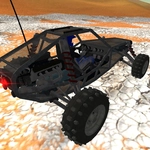
📝Buggy Simulator Overview
Tear across off-road terrain in a buggy that bounces, tumbles, and powerslides through every dune and ditch.
💬What is Buggy Simulator?
This isn't a polished arcade racer—it's raw, physics-driven chaos. You get a lightweight buggy and a huge open space full of bumps, slopes, and jagged rocks. The suspension actually compresses when you land a jump, wheels spin in loose dirt, and the whole thing feels like it's one bad decision away from a spectacular rollover. I spent way too long launching off a dune just to see how many flips I could survive before the frame twisted sideways.
There's a rocky hill near the edge of the map that taught me everything. Hit the boost at the right angle, then yank the handbrake to swing the rear end around—you don't just climb the hill, you drift around its whole base. First time I did it, I slid over a ridge, caught air, and landed sideways. Then I rolled it. R resets the whole environment, G only resets the buggy's position. That difference matters: sometimes you want to keep the skid marks and terrain damage but not the crash.
C cycles through camera views. The chase cam is best for speed, but there's a top-down angle for picking a line through rocks. Left shift gives a burst of speed, but it's not unlimited—too much boost on a bumpy section and you'll flip end over end. That's not a bug, it's the game. Five minutes turns into an hour because there's always one more jump, one more hill, one more 'what if I hit boost here?'
👥How to Play Buggy Simulator
WASD or arrow keys = drive car
Space bar = handbrake
C = change camera
Left shift = boost
R = reset scene
G = reset car
✨Game Tips
Tap the handbrake mid-turn to tighten your line without losing all momentum.
Save the boost for steep climbs or clearing wide gaps—wasting it on flat ground just flips you.
Use C to switch cameras; the top-down view makes rocky sections much easier to navigate.
If you're hopelessly stuck, hit R to reset the scene, but use G if you only want to respawn the car.
Lean into the bounce. The suspension isn't forgiving, so let it settle before you gun it again.
🔧FAQ
Q: Is Buggy Simulator free to play?
A: Yes, it's completely free in your browser with no payment required.
Q: Can I play Buggy Simulator on mobile?
A: The web version runs in mobile browsers, but keyboard controls are recommended for best handling.
Q: Do I need to download or install anything?
A: No download needed. It runs directly in your browser as an HTML5 game.
Q: What are the controls for Buggy Simulator?
A: WASD or arrow keys drive, Space is handbrake, C changes camera, Left Shift boosts, R resets scene, G resets car.
Q: Does Buggy Simulator work offline?
A: Once loaded, the game can run offline if the page stays open, but you need internet to access it initially.
Q: Is Buggy Simulator unblocked at school?
A: Yes, this unblocked version bypasses typical school filters, so you can play without restrictions.