
Bus Park 3D
Play Count0
Published2025-11-05
Supported DevicesPC + Mobile
CategoryAdventure & RPG
Rating★★★★★5.0Rate this game
📝Bus Park 3D Overview
Park a 40-foot bus in a spot barely wider than its mirrors. Good luck.
💬What is Bus Park 3D?
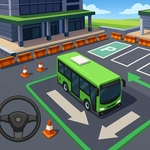
Bus Park 3D drops you behind the wheel of a city bus and asks you to thread it through parking lots, around barriers, and into painted bays. The camera sits low behind the vehicle, so judging distance takes real concentration. I spent a solid ten minutes on one level just reversing and adjusting because the rear bumper kept kissing a lamppost. The controls are simple—tap or click to accelerate, steer with on-screen arrows or mouse—but the bus's long wheelbase means every slight input gets amplified. You'll learn to straighten the wheels before you think you're done, or you'll be doing the awkward shuffle.
What surprised me is how much patience the game rewards. There's no timer on most levels, so you can creep forward at a snail's pace and still feel like a hero when that bus finally slides into place. The graphics are clean but not flashy; concrete barriers and painted lines read clearly, which matters when you're trying to spot a two-inch gap in the mirror. The sound of the engine is a low rumble that almost makes you forget you're playing in a browser.
If you enjoy slow-burn precision driving, this one scratches an itch. It's not about speed—it's about not clipping a fire hydrant while turning a 30-foot rectangle into a parking space. I kept coming back after each failure, convinced the next attempt would be the clean one. Usually it wasn't, and that's fine.
👥How to Play Bus Park 3D
Mouse click or tap to play
✨Game Tips
Use the top-down camera view before you start moving—it reveals the exact path to the bay.
Adjust your mirrors often; they're your only real guide for the rear wheels.
If the bus starts to jackknife, stop and turn the wheels fully the opposite way before reversing.
Patience beats speed: no timer means you can inch forward without penalty.
Keep an eye on the front left corner during right turns; it's the most common scrape point.
After you think you're parked, check the side mirrors once more before pressing the confirm button.
🔧FAQ
Q: Is Bus Park 3D free to play?
A: Yes, it runs free in any modern web browser with no hidden fees.
Q: Can I play Bus Park 3D on my phone?
A: The game supports touch controls, so you can play on mobile and tablet devices.
Q: Do I need to download or install anything?
A: No downloads required—just open the page and start parking.
Q: What are the controls for Bus Park 3D?
A: Use mouse click or tap to accelerate; on-screen buttons or keyboard arrows handle steering.
Q: Is there a time limit in Bus Park 3D?
A: Most levels have no timer, so you can take as long as you need.
Q: Which browsers work best with Bus Park 3D?
A: Chrome, Edge, Firefox, and Safari all run the game smoothly.