
Call of Ops 2
Play Count0
Published2020-06-22
Supported DevicesPC
CategoryAdventure & RPG
Rating★★★★★5.0Rate this game
📝Call of Ops 2 Overview
You're pinned behind a rusted car, reloading with shaking hands while bullets chew through metal. Welcome to the fight.
💬What is Call of Ops 2?
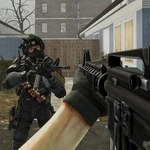
I'll be honest, I didn't expect much from a browser FPS. Call of Ops 2 surprised me though. It's a compact shooter with a proper single-player campaign feel — you move through gray industrial arenas, pick off enemies from behind crates, and push forward room by room. The controls are standard WASD plus mouse aim, with R to reload and B to open the buy menu mid-fight. That little shop is where things get interesting: you earn cash per kill and can grab an AK, a shotgun, or even a sniper rifle depending on the situation.
One moment stuck with me: I was low on health, backing down a narrow corridor, and I popped the buy menu to drop every cent on a shotgun. The enemy rounded the corner, I hit B to close the menu, and one blast cleared the doorway. Felt genuinely tense, like a mini escape from a CS:GO match. The AI isn't brilliant — they'll rush you or stand still sometimes — but that predictability gives you room to experiment with different weapons and angles. Headshots feel crisp thanks to a hit marker and a little red flash, which is exactly what you want from a free browser game.
If you're looking for a deep story or huge maps, this isn't it. But as a quick adrenaline fix during a break, Call of Ops 2 nails the basics. It respects your time: no menus full of ads, no forced tutorials, just load in and start clicking heads. The graphics are simple but clean, with enough shadows and clutter to make corners feel dangerous. I found myself replaying levels just to try a pistol-only run. That's the sign of a solid little shooter.
👥How to Play Call of Ops 2
WASD - Move. Mouse - Shoot. R - Reload. B - Buy weapons.
✨Game Tips
Peek corners with A/D strafing instead of pushing forward — enemies love to wait just outside your field of view.
🔧FAQ
Q: Is Call of Ops 2 free to play?
A: Yes, it's completely free to play in your browser — no download or payment required.
Q: Can I play Call of Ops 2 on mobile?
A: The game uses keyboard and mouse controls, so mobile isn't officially supported. A desktop or laptop works best.
Q: Do I need to install anything to play Call of Ops 2?
A: No installation needed. Just open the page and it runs directly in any modern web browser.
Q: What are the controls for Call of Ops 2?
A: WASD moves, mouse aims and shoots, R reloads, and B opens the weapon buy menu. That's all you need.
Q: Does Call of Ops 2 save my progress?
A: Progress isn't saved between sessions. Each playthrough starts fresh, but you can buy weapons again with earned cash.
Q: Is Call of Ops 2 multiplayer?
A: No, it's a single-player game against AI enemies. There's no online multiplayer mode.