
Car Driver
Play Count0
Published2022-05-02
Supported DevicesPC
CategoryAdventure & RPG
Rating★★★★★5.0Rate this game
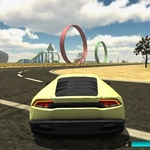
📝Car Driver Overview
Strap in, grab the keys, and see if you can handle the twisty roads without wrapping your ride around a tree — your keyboard is the only thing between you and a ditch.
💬What is Car Driver?
I'll be honest: the first time I played Car Driver I slammed into a concrete barrier within ten seconds. The steering felt heavier than I expected, like driving a real car with worn tires. That's not a complaint though — once you get used to the weight transfer, every corner becomes a tiny puzzle. You learn to brake before the turn, ease off the throttle mid-apex, and punch the gas just as the front wheels straighten out.
The game throws you onto a network of roads with traffic, intersections, and the occasional sharp hairpin. There's no story, no nitro boosts, no ramps — just you, a car, and the road. And that's exactly why I kept coming back. It's a pure driving challenge for people who like the feeling of controlling a vehicle rather than watching a cutscene. The keyboard controls are responsive but not twitchy. Arrow keys handle steering and speed, the spacebar acts as a handbrake, and you'll need it more than you think when the road narrows and a truck appears out of nowhere.
One moment that stuck with me: I was cruising down a long straight, engine whining in my ears, and I saw a sharp left turn ahead. I waited too long to brake, flicked the handbrake in panic, spun 180 degrees, and ended up facing the traffic I'd just passed. I laughed, reversed, and tried again. That's the game. No respawn screen, no score penalty — just another chance to get the line right. If you enjoy games where the only reward is a clean lap and a growing sense of skill, Car Driver delivers that in a compact, unblocked package.
👥How to Play Car Driver
Keyboards : Controls
✨Game Tips
Tap the accelerator lightly instead of flooring it — traction is everything on tight corners.
Use the spacebar handbrake to rotate the rear end when a corner is sharper than you expected.
Brake before the turn, not during it; braking mid-corner makes the car plow straight.
Watch for oncoming traffic at intersections and always leave yourself room to swerve.
Practice on the first straightaway to feel how long the car takes to turn at speed.
If you spin out, don't panic — tap the opposite direction and ease off the throttle to recover.
🔧FAQ
Q: Is Car Driver free to play?
A: Yes, Car Driver is completely free in your browser with no payment required.
Q: Can I play Car Driver on mobile?
A: It works on most mobile browsers, but keyboard controls are recommended for the best experience.
Q: Do I need to download anything to play Car Driver?
A: No downloads or installs needed — just open the game and start driving.
Q: What are the keyboard controls for Car Driver?
A: Use arrow keys or WASD to steer, accelerate, and brake. Spacebar is the handbrake.
Q: Does Car Driver save my progress?
A: This web version doesn't save progress, so try to finish your run in one sitting.
Q: Is Car Driver suitable for kids?
A: Yes, it's a family-friendly driving game with no violence or gore.