
Car Simulator 3D
Play Count0
Published2025-08-13
Supported DevicesPC + Mobile
CategoryAdventure & RPG
Rating★★★★★5.0Rate this game
📝Car Simulator 3D Overview
Slide behind the wheel of a detailed 3D car and tear through city streets — no traffic rules apply unless you want them to.
💬What is Car Simulator 3D?
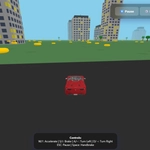
Car Simulator 3D drops you behind the wheel with a surprisingly simple setup: W to go, S to stop, A and D to steer, and Space for the handbrake when you want to get sideways. That handbrake is the whole reason I kept coming back — tapping it mid-turn sends the car into a proper drift, and on a long city block you can chain corners like you're in a low-budget street racing film.
The city itself feels bigger than you'd expect from a browser game. You can weave through intersections, cut across empty lots, or just cruise down a wide avenue watching the buildings slide past. There's no traffic to dodge unless the map loads some, so it's mostly about pure driving feel. The 3D view sits behind the car, and the camera follows smoothly enough that you never lose sense of where the nose is pointing. One thing I noticed: the car doesn't flip easily, but if you overdo the handbrake at speed you'll kiss a curb and spin — which is honestly half the fun.
If you're looking for a quick driving fix without downloading a 50GB sim, this scratches that itch. It won't teach you real racing lines or clutch control, but for a few minutes of messing around in a virtual city, it delivers. Just don't expect a garage full of upgrades or a story mode; it's a stripped-down, get-in-and-drive kind of game.
👥How to Play Car Simulator 3D
Controls: W/↑: Accelerate | S/↓: Brake | A/←: Turn Left | D/→: Turn Right ESC: Pause | Space: Handbrake
✨Game Tips
Tap Space for the handbrake just before a corner to slide the rear end around; it's the fastest way to make tight turns.
At high speed, avoid holding A or D too long — small steering inputs keep you from fishtailing into buildings.
Use W and S together (or just S) to brake hard if you're heading for a wall; don't rely on the handbrake alone.
If you end up stuck facing the wrong way, reverse with S while turning to do a quick three-point turn.
The camera is locked behind the car, so use long straight roads to judge your speed and plan drifts ahead.
🔧FAQ
Q: Is Car Simulator 3D free to play?
A: Yes, it's completely free in your browser with no payment required.
Q: Can I play Car Simulator 3D on my phone?
A: It works on mobile browsers, but keyboard controls are best on desktop.
Q: Do I need to download or install anything?
A: No downloads needed — just open the page and start driving.
Q: Does Car Simulator 3D save my progress?
A: It's a sandbox driving game, so there's no save system or career mode to worry about.
Q: What are the controls for Car Simulator 3D?
A: W/up arrow accelerates, S/down brakes, A/D turn, Space is handbrake, and ESC pauses.
Q: Is Car Simulator 3D unblocked at school?
A: Yes, it's an unblocked game you can play on school or work networks without restrictions.