
Car Stunt Raching
Play Count0
Published2023-12-07
Supported DevicesPC
CategoryAdventure & RPG
Rating★★★★★5.0Rate this game
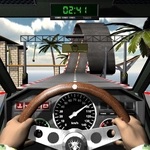
📝Car Stunt Raching Overview
Slingshot off ramps, flip through the air, and nail the landing in this high-octane 3D stunt driving playground.
💬What is Car Stunt Raching?
Car Stunt Raching doesn't care about realism. It cares about you holding down the gas, launching off a ramp, and seeing how many flips you can pull before the track reminds you that gravity exists. That's the whole pitch, and honestly? It works.
The controls are dead simple: arrow keys or mouse to steer, up/left click for gas, down/right click for brake. But the magic is in how the physics let you chain stunts. You'll nail a clean jump, then try to tap brake mid-air to rotate forward, and suddenly you're doing a front flip onto a platform. I accidentally discovered you can use the brake to pitch the nose down, which saved me from landing on my roof more times than I'd like to admit.
The 3D arenas are built for messing around — giant ramps, loops, and gaps everywhere. The camera (press C) lets you switch angles, though I mostly stuck with the chase cam because it makes landings feel more dramatic. There's no timer, no score pressure unless you make your own challenges. Just you, a car, and a physics engine that's forgiving enough to be fun but strict enough that a bad landing will send you tumbling. It's the kind of game you open for five minutes and suddenly an hour's gone.
👥How to Play Car Stunt Raching
Keyboard:
*left-right* = turn the steering
*up*=gas pedal
*down*=brake pedal
c=camera
Mouse:
*mouse left-right* = turn the steering
*left mouse button*=gas pedal
*right mouse button*=brake pedal
✨Game Tips
Treat the brake like an air control: a quick tap pitches the nose down.
Line up straight before the ramp; angled launches usually end with a rollover.
Switch to the hood cam with C when aiming for narrow platforms.
Mouse steering feels smoother, but keyboard lets you hold a steady turn during long drifts.
Speed is everything, but entering a loop too fast will fling you off the side.
🔧FAQ
Q: Is Car Stunt Raching free to play?
A: Yes, it's completely free in your browser with no downloads or sign-ups required.
Q: Can I play Car Stunt Raching on mobile?
A: It's built for desktop, but you can try it on mobile—expect some control limitations.
Q: Do I need to download anything to play Car Stunt Raching?
A: No, it runs right in your web browser using HTML5.
Q: What are the controls for Car Stunt Raching?
A: Use arrow keys or mouse to steer, up/left click for gas, down/right click for brake. Press C to change camera.
Q: Can I change the camera angle in Car Stunt Raching?
A: Yes, press C to cycle through camera views until you find one that works for you.
Q: Is Car Stunt Raching suitable for kids?
A: It's a stunt driving game with no violence or objectionable content, so younger players can enjoy it.