
City Cargo Truck Driving Game
Play Count0
Published2025-10-30
Supported DevicesPC + Mobile
CategoryAdventure & RPG
Rating★★★★★5.0Rate this game
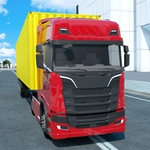
📝City Cargo Truck Driving Game Overview
Haul freight through busy city streets in a heavy cargo truck, and try not to smash your rig into a lamppost.
💬What is City Cargo Truck Driving Game?
You know that moment when you're halfway through a tight alley and realize your trailer isn't following the way you thought it would? That's City Cargo Truck Driving Game in a nutshell. The first thing I noticed is how the steering actually feels weighted—not like a go-kart, but like a real truck that wants to keep going straight when you'd rather it turned. You'll need to brake early, swing wide on corners, and keep an eye on your mirrors (okay, there aren't real functional mirrors, but you'll learn to judge the trailer's arc).
The controls are simple: W or Up to move forward, S or Down for reverse, A/D or Left/Right to steer, and your mouse handles any menu buttons. Sounds easy until you're trying to back a loaded trailer into a narrow loading bay while a sedan spawns right behind you. The 3D camera stays mostly behind the truck, which helps, but depth perception gets tricky near curbs and streetlights. I clipped a fire hydrant once and spent a good minute just straightening out.
What kept me coming back was how oddly satisfying it is to complete a delivery without any dings. There's no timer breathing down your neck, so you can crawl along at 10 mph if you want to admire the blocky city buildings. But then you get confident, floor it on a straightaway, and suddenly you're doing a 45-degree drift into a bus stop. That's the real test—knowing when to hold back. If you like driving sims that punish arrogance but reward patience, this one will eat an afternoon.
👥How to Play City Cargo Truck Driving Game
W / Arrow Up → Move Front
S / Arrow Down → Move Back
A / Arrow Left → Move Left
D / Arrow Right → Move Right
- To click any button use mouse
✨Game Tips
Brake before the corner, not during it—trucks plow straight if you're carrying speed.
Use the mouse for menu buttons; keyboard only handles movement and steering.
When backing up, turn the opposite direction from where you want the trailer to go.
Watch the trailer's rear wheels on tight turns; that's the part that clips curbs.
Don't floor it on straightaways—a loaded rig gets speed wobbles and understeers hard.
If you get stuck, reversing slowly is usually safer than gunning the throttle forward.
🔧FAQ
Q: Is City Cargo Truck Driving Game free?
A: Yes, it's completely free to play in your browser with no hidden fees.
Q: Can I play City Cargo Truck Driving Game on mobile?
A: The game works best on desktop with a keyboard, but touch controls may work depending on your device.
Q: Do I need to download anything to play?
A: No downloads needed. Just open the game in any modern web browser.
Q: What are the controls for City Cargo Truck Driving Game?
A: Use W/Up for forward, S/Down for reverse, and A/D or Left/Right to steer. Mouse for buttons.
Q: Is there a time limit for deliveries?
A: No time limit—you can drive at your own pace and focus on not crashing.
Q: Can I change the camera angle?
A: The camera stays behind the truck by default, but some versions allow a quick look with the mouse.