
City Coach Driving Games 3d
Play Count0
Published2026-04-20
Supported DevicesPC + Mobile
CategoryAdventure & RPG
Rating★★★★★5.0Rate this game
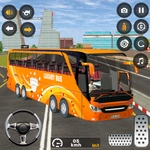
📝City Coach Driving Games 3d Overview
Wrestle a massive city coach through tight streets and heavy traffic without turning it into a wreck.
💬What is City Coach Driving Games 3d?
You ever sit in traffic and think, man, I could do a better job than this bus driver? Here's your shot. City Coach Driving Games 3d drops you behind the wheel of a long, heavy coach in a busy urban map. It's not a route simulator with passenger pickups—it's more of a free-drive sandbox where the only goal is to keep that beast moving without clipping a lamppost or rear-ending a sedan. The first time I tried to take a left turn, I swung so wide I ended up on the sidewalk. Learn from my pain.
The controls are simple enough: WASD or arrows on PC, and on-screen buttons for gas and brake on mobile. But simple controls don't mean easy driving. The coach has real weight to it. You'll feel it understeer when you floor it out of a corner, and braking late means the back end slides out in a way that would get you fired from any real transit job. Traffic spawns erratically, so you're constantly scanning ahead, tapping the brakes, and praying nobody cuts you off. It's weirdly meditative once you get into a rhythm—just you, the hum of the engine, and a city that doesn't care if you're late.
What keeps me coming back is the lack of hand-holding. No minimap arrows, no checkpoint timer, no tutorial nagging you. You just drive. Want to drift a bus? Go for it. Want to park perfectly in a loading zone? That's on you too. It's a low-stakes way to pretend you're a professional driver without the CDL. Just don't blame me if you start narrating your turns like a tour guide.
👥How to Play City Coach Driving Games 3d
PC: Use WASD or Arrow Keys to drive
Mobile: Use on-screen buttons to control the vehicle
On Mobile: Use race button to accelerate and brake button to stop
✨Game Tips
Brake earlier than you think—coaches carry a lot of momentum and stop slower than cars.
Swing wide on turns, like a real bus driver, or your rear wheels will climb the curb.
Use the mouse to look around if you're on PC; it helps spot traffic before you change lanes.
On mobile, feather the gas button instead of holding it full—it gives you smoother control.
If you get stuck against a wall, reverse gently instead of gunning it; the coach pivots slowly.
Treat red lights as optional, but watch for cross traffic—AI drivers don't forgive sudden stops.
🔧FAQ
Q: Is City Coach Driving Games 3d free to play?
A: Yes, it's completely free. You can open it in your browser without paying anything.
Q: Can I play City Coach Driving Games 3d on my phone?
A: Absolutely. The mobile version has on-screen gas and brake buttons for touch controls.
Q: Do I need to download City Coach Driving Games 3d?
A: No download needed. It runs in your browser using HTML5, so just click and drive.
Q: What are the controls for City Coach Driving Games 3d on PC?
A: Use WASD or arrow keys. W/Up accelerates, S/Down brakes or reverses, A/D or Left/Right steers.
Q: Is there a multiplayer mode in City Coach Driving Games 3d?
A: No, it's a single-player driving sandbox. You're the only coach on the road, but traffic AI is enough.
Q: Can I save my progress in City Coach Driving Games 3d?
A: There's no save system. It's a free-roam driving experience, so you start fresh each session.