
City Driver - Drive Around The City
Play Count0
Published2021-10-15
Supported DevicesPC
CategoryAdventure & RPG
Rating★★★★★5.0Rate this game
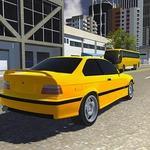
📝City Driver - Drive Around The City Overview
Slip behind the wheel, fire up the engine, and lose yourself in a sun-drenched digital metropolis where the only route is the one you pick.
💬What is City Driver - Drive Around The City?
I've spent a stupid amount of time in City Driver just cruising around for the sake of cruising. It's not a racing game—no checkpoints screaming at you, no timer ticking down. You just hop in a car and drive. The city feels decently sized for a browser title: wide avenues that beg you to floor it, tight side streets where you'll clip a curb, and the kind of roundabouts that make you question your steering judgment. The keyboard controls are straightforward enough (arrows or WASD, depending on the build), so within thirty seconds you'll be rolling through intersections without a care.
One moment that stuck with me: I was trying to pull a clean line around a big fountain in a plaza and ended up doing a three-point turn that turned into a ten-point nightmare. The collision physics are lighthearted—cars bounce, scrape, and slide more than they crumple—so I never got annoyed. That's the mood here. It's less about mastery and more about filling that itch to roam a digital space without consequences. If you've ever loaded up a big open-world game just to drive in circles while listening to music, this scratches that same itch without the 60GB install.
No story, no upgrades, no fuel gauge. Just a city, a car, and the open road. It's the kind of game you leave open in a tab when you need a mental reset between homework problems or a boring online meeting. You'll find yourself taking the long way on purpose.
👥How to Play City Driver - Drive Around The City
Keyboard Controls
✨Game Tips
Take a slow lap around the block first to get a feel for steering sensitivity and brake distance.
Don't be afraid to crash—there's no damage penalty, so treat lampposts like suggestions.
Switch camera angles if the default view makes tight turns awkward; a hood cam can help you judge corners.
Use the handbrake or hard brake early before sharp intersections to avoid understeer into buildings.
Look for busier districts or wider boulevards if you want to test top speed without constantly stopping.
If the city feels too empty, reload the page—some builds randomly adjust traffic density.
🔧FAQ
Q: Is City Driver - Drive Around The City free?
A: Yes, it's completely free to play in your browser with no hidden fees or subscriptions.
Q: Can I play City Driver on mobile?
A: The game is designed for keyboard controls, so mobile touch support is limited or unavailable.
Q: Do I need to download anything to play?
A: No download needed. It runs on HTML5 and works right in your web browser.
Q: What are the keyboard controls?
A: Use arrow keys or WASD to steer, accelerate, and brake. Some versions also include a handbrake on spacebar.
Q: Is City Driver multiplayer?
A: No, it's a single-player experience. You drive alone through the city.
Q: Does City Driver have missions or goals?
A: No missions or objectives. It's pure free-roam driving for relaxation and exploration.