
Crazy Driver Noob
Play Count0
Published2023-01-25
Supported DevicesPC + Mobile
CategoryAdventure & RPG
Rating★★★★★5.0Rate this game
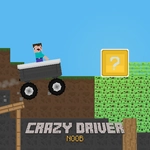
📝Crazy Driver Noob Overview
Slam the gas, fight the wobble, and try not to flip your car into orbit as a total rookie behind the wheel.
💬What is Crazy Driver Noob?
Crazy Driver Noob drops you behind the wheel of a car that handles like it's held together with duct tape and bad decisions. You're not a seasoned racer—you're a total rookie, and the game makes sure you feel every wobble. The goal is simple: get from point A to point B without becoming a fireball. But the road throws ramps, gaps, and physics that laugh at your attempts to stay upright.
The controls sound basic—W to move, A and D to shift weight—but the real challenge is reading the car's tilt before it's too late. I spent my first five runs doing backflips off the starting ramp. Then it clicked: you don't drive this thing, you nurse it. A quick tap of D just as the front wheels lift can save a run. It's all about micro-adjustments; hold a key too long and you'll overcorrect into a roll. The mobile touch controls are just as twitchy, which keeps things fair.
What keeps me coming back is the sheer comedy of failure. Watching your noob driver ragdoll out of the windshield never gets old. It's not a long game, but for a quick burst of stupid fun between classes, it's perfect. Just don't expect to feel like a hero—you'll be the village idiot of driving, and that's the point.
👥How to Play Crazy Driver Noob
Press the "W" key to move forward.
Press the "W" key to go backwards.
Press "A and D" Keys to adjust the balance of the car.
*Mobile Touch Control
✨Game Tips
Tap W in short bursts—holding it down just launches you nose-first into the sky.
Watch the car's shadow to judge tilt before you hit a ramp.
Use A/D as soon as the front wheels lift, not after you're already vertical.
Reverse is underrated; back up to line up awkward landings.
Don't panic if you start to tip—lean into the fall with a tap to soften the impact.
Mobile users: drag left/right earlier than you think, the touch response has a slight delay.
🔧FAQ
Q: Is Crazy Driver Noob free to play?
A: Yes, it runs right in your browser with no paywall or hidden fees.
Q: Can I play Crazy Driver Noob on my phone?
A: Yes, the game supports mobile touch controls for driving and balancing the car.
Q: Do I need to download anything to start playing?
A: No downloads or installs are needed—just open the page and press W (or tap on mobile).
Q: What are the keyboard controls for Crazy Driver Noob?
A: Use W to move forward/backward, and A/D keys to adjust the car's balance left or right.
Q: Why does my car keep flipping over?
A: The physics are intentionally wobbly; tap the balance keys earlier and with shorter presses to stay upright.
Q: Is Crazy Driver Noob unblocked at school?
A: This version runs on standard HTML5, so it should work on most school networks without restrictions.