
Cube Run
Play Count0
Published2020-09-07
Supported DevicesPC
CategoryAdventure & RPG
Rating★★★★★5.0Rate this game
📝Cube Run Overview
Dodge, weave, and slide through a neon obstacle course where one wrong twitch sends your cube tumbling into the void.
💬What is Cube Run?
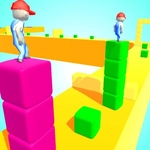
I'll be honest: I died about forty times in my first fifteen minutes, and I'm not even mad about it. Cube Run drops you onto a winding 3D track that looks like someone poured glowing paint over a rollercoaster, then hands you one job — don't fall off. Your cube auto-runs forward; you just steer left and right with the mouse. Sounds simple, until the track narrows to a strip barely wider than your box, then throws a 90-degree turn while the walls close in.
The genius here is in the tactile feel. The cube snaps to your mouse position with almost zero lag, so every twitch matters. You'll find yourself leaning your whole body into sharp corners, only to realize you're at a desk. Speed ramps up without warning, and obstacles shift from static walls to moving barriers that force split-second reads. There's a rhythm to it — dip left, cut right, skip across a gap like a stone on water. One misjudged flick and you're spinning into the abyss, but the restart is instant, which is exactly what keeps you saying 'one more run.'
Visually it's clean and bright, no clutter to hide behind. The real opponent is your own nerves. I kept chasing a slightly higher score, convinced the next obstacle was predictable, only to discover the track had other plans. If you want a game that turns idle fidgeting into white-knuckle focus, this is the one. Just don't blame me when your wrist starts cramping from the death grip.
👥How to Play Cube Run
Mouse Only
✨Game Tips
Keep your cube near the center of the track until you see the next turn — edges are for show-offs who like dying.
Use tiny mouse nudges instead of big swipes; the cube responds faster than you think.
Focus on the track ahead, not your cube, to anticipate gaps and moving walls.
Speed increases after set distances — practice holding steady without panicking.
If you're about to fall, jerk toward the wider section even if it feels wrong.
Restart instantly; don't waste time watching the death animation.
🔧FAQ
Q: Is Cube Run free to play?
A: Yes, Cube Run is completely free on our site, no hidden charges.
Q: Do I need to download anything to play Cube Run?
A: No download needed. It runs right in your browser as an HTML5 game.
Q: Can I play Cube Run on my phone?
A: It's designed for mouse, so desktop is best. Mobile touch may work but feels less precise.
Q: How do I control the cube in Cube Run?
A: Move your mouse left or right on the screen to steer. The cube follows your cursor.
Q: Is Cube Run allowed at school?
A: It's unblocked on our site, but check your school's rules about gaming.
Q: Why does my cube keep falling off?
A: You're probably oversteering. Use gentle moves and keep your eyes on the track, not the cube.