
Diamond Painting ASMR Coloring
Play Count0
Published2021-02-24
Supported DevicesPC
CategoryAdventure & RPG
Rating★★★★★5.0Rate this game
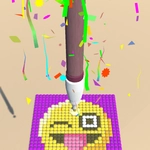
📝Diamond Painting ASMR Coloring Overview
Grab a stylus, pick a color, and lose yourself in the satisfying click of every tiny gem snapping into place.
💬What is Diamond Painting ASMR Coloring?
Diamond Painting ASMR Coloring is the digital equivalent of those diamond painting kits you see in craft stores, minus the mess and the missing gems. You get a canvas covered in tiny numbered cells, and your job is to drag the correct colored diamond onto each spot. Sounds simple, right? That's the trap. The first picture I did was a little flower. Ten minutes later I was halfway through a full mandala and my coffee had gone cold.
What makes it work is the feel. The drag controls are surprisingly precise — you can zoom in to hit individual cells or sweep across a row to fill multiple spots at once. Every gem lands with a soft, tactile click that actually reduces stress instead of adding to it. There's a color guide on the side that highlights which number you're working on, so you won't get lost even on the more detailed designs. No timers, no fail states, no pop-up ads screaming at you.
The real aha moment happens when you finish a section and step back (or zoom out) — suddenly the random dots become a shimmering picture. It's that same dopamine hit you get from coloring apps but with a satisfying 3D sparkle. I kept telling myself "one more section" until the whole thing was done. If you need something to unwind with after a long day, this one does the job better than most meditative games.
👥How to Play Diamond Painting ASMR Coloring
Drag to play.
✨Game Tips
Zoom in on small numbered sections so you don't accidentally drag the wrong gem onto a tiny cell.
Use the color guide to quickly spot which number you're on — it saves a ton of squinting.
Sweep your cursor across a row of same-color cells to fill them in one motion instead of clicking each one.
Turn your volume up or put on headphones; the ASMR click sounds are genuinely half the experience.
Knock out the largest color area first to get a satisfying chunk done before tackling fiddly details.
If you misplace a gem, just drag a new one over it — no undo needed, it overwrites automatically.
🔧FAQ
Q: Is Diamond Painting ASMR Coloring free?
A: Yes, it's completely free to play in your browser with no paywalls.
Q: Can I play Diamond Painting ASMR Coloring on mobile?
A: Yes, it works on most modern phones and tablets using touch controls.
Q: Do I need to download anything?
A: No download needed — it runs directly in your web browser.
Q: What if I can't find a specific number on the canvas?
A: Use the color guide panel; it highlights matching cells when you select a color.
Q: Is there a way to undo a mistake?
A: No undo button, but dragging a new gem over the wrong one replaces it instantly.
Q: Does Diamond Painting ASMR Coloring have sound?
A: Yes, satisfying ASMR click sounds play when you place gems, and you can mute them if needed.