
Fuuta
Play Count0
Published2023-04-03
Supported DevicesPC + Mobile
CategoryAdventure & RPG
Rating★★★★★5.0Rate this game
📝Fuuta Overview
Double-jump your way through a quirky little world where every ledge is a puzzle and falling means starting over.
💬What is Fuuta?
I wasn't sure what to expect from Fuuta, but the double jump hooked me within the first minute. You play as a small, round character who can leap once and then again mid-air — that second jump is everything. It's not just a safety net; it's how you reach higher platforms, dodge falling hazards, and correct a bad first jump. The controls are simple: WASD or arrow keys, with W or Up held twice for the double jump. But the game tests your timing more than your button mashing. There's this one section where you have to bounce off a moving platform, and if you hit the second jump too early you'll clip the edge and tumble down. I died there maybe a dozen times before I realized the trick is to wait until you're just past the apex of your first jump.
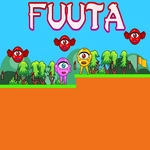
The world is bright and a little strange — pastel colors, floating islands, and some weird little creatures that don't hurt you but do get in your way. The camera follows smoothly, and the levels are short enough that retrying doesn't feel like punishment. It's the kind of game that rewards patience and precise inputs, not speed. You'll miss jumps, sure, but the reset is quick and the distance between checkpoints is fair. I found myself muttering 'one more try' more often than I'd like to admit.
Is it perfect? The double jump can feel a little floaty, and occasional frame skips can mess with your timing, but those are minor gripes. The core loop is solid, and once you learn the rhythm of when to commit to the second jump, the game opens up. I'd recommend playing with the sound on — the little 'boing' when you double jump is weirdly satisfying and helps you time it.
👥How to Play Fuuta
Use "WASD" or "Arrow" keys for the player's movement.
Use "W" or "Up" arrow key twice for double jump.
✨Game Tips
• Get comfortable with the double jump delay: the second jump activates only after you release the first jump key, not while holding.
• Use the double jump to correct overhangs — you can change direction mid-air if you time the second press.
• Watch for moving platforms; they have a rhythm, so count the beats before jumping.
• Don't rush: most tricky sections can be passed by standing still and waiting for the right moment.
• If you're on a long fall, spam the second jump — sometimes it saves you from a pit.
• Keep your first jump short if you're unsure; you can always extend with the second.
🔧FAQ
Q: Is Fuuta free to play?
A: Yes, it's completely free in your browser with no paywalls or hidden fees.
Q: Can I play Fuuta on a mobile device?
A: The game is built for keyboard controls, so a desktop or laptop is recommended. Touch controls are not supported.
Q: Do I need to download anything to play?
A: No download needed. Just load the page and start jumping — it runs directly in your browser.
Q: What are the controls for Fuuta?
A: Use WASD or arrow keys to move, and press W or Up twice to double jump.
Q: Does Fuuta have a save system or checkpoints?
A: Yes, the game includes checkpoints, so you won't restart the whole level after a fall.
Q: Is Fuuta suitable for kids?
A: Yes, it's a non-violent platformer with simple controls and colorful visuals, good for all ages.