
Gemstones World
Play Count0
Published2023-04-18
Supported DevicesPC + Mobile
CategoryKids & Educational
Rating★★★★★5.0Rate this game
📝Gemstones World Overview
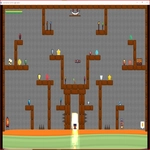
Hop, turn, and snatch every glittering gem in this cheerful side-scroller built for young explorers who love a quick reward around every corner.
💬What is Gemstones World?
Gemstones World keeps things wonderfully simple, and that's exactly why it works. You control a little explorer who can only move forward, jump, and turn around — no complicated attack buttons, no inventory juggling. My five-year-old cousin picked it up in seconds and was giggling every time she flipped direction mid-jump to grab a gem she'd overshot. The levels are bright and friendly, with gems scattered across platforms, and each one you collect gives a satisfying little sparkle.
What surprised me is how much the limited controls add to the challenge. The right arrow always pushes you forward, so timing your jumps and knowing when to turn back become the whole game. There's a gentle learning curve — early stages let you stomp around at your own pace, but later stretches have gaps and raised ledges that punish impatient hopping. I caught myself leaning into the keyboard like that would somehow make the jump arc longer.
There's one section where a gem floats just over a pit, and if you don't turn before you land, you'll tumble into the gap. That's when the simple controls stop feeling simple. If you're after a low-stress platformer with a cute gem-hunting loop, this one'll keep a kid busy for a solid afternoon. It runs right in the browser too, so no installs, no logins, just jump in.
👥How to Play Gemstones World
Right arrow key for going forward
Space or top arrow key for jump
Left arrow key for turn back.
✨Game Tips
- Tap the jump button a hair before you reach the edge — the forward momentum carries you farther than it looks.
- Turning around mid-air is the safest way to snag gems that sit on narrow ledges.
- Don't hold right arrow the entire time; a lighter touch gives you more control when landing.
- If a gap looks too wide, back up and take a running start from the higher platform for extra distance.
- Keep an eye on the sparkle trail after collecting gems — it often points to the next cluster.
- Start by grabbing all the low-hanging gems first, then work up to the risky platform jumps.
🔧FAQ
Q: Is Gemstones World free to play?
A: Yes, it's free in your browser with no hidden paywalls or download fees.
Q: Can I play Gemstones World on mobile?
A: The game uses keyboard controls, so it's best on a computer. Some mobile browsers may support on-screen keys, but it isn't optimized for touch.
Q: Do I need to download anything to play?
A: No download is required. It runs directly in your web browser as an HTML5 game.
Q: How do I control the character in Gemstones World?
A: Use the right arrow to move forward, left arrow to turn back, and space or up arrow to jump.
Q: Is Gemstones World suitable for young kids?
A: Absolutely. There's no violence, timers, or scary elements — just gem collecting and simple platforming.
Q: What if the game won't load on my school computer?
A: Try refreshing the page or using Chrome or Edge. Some school networks block games, so you may need to ask IT to allow the site.