
Grand City Driving
Play Count0
Published2020-06-24
Supported DevicesPC
CategoryAdventure & RPG
Rating★★★★★5.0Rate this game
📝Grand City Driving Overview
Slide behind the wheel, punch the gas, and tear through a sprawling city where every intersection hides a new shortcut.
💬What is Grand City Driving?
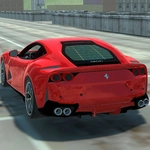
Grand City Driving drops you into a sprawling urban grid with no checklist, no timer, and no one telling you where to go. That freedom is the whole point. You press W, the engine growls, and suddenly you're weaving between buildings, running red lights just because you can. The handling leans arcade-style — forgiving enough to take a corner at speed, but loose enough that you'll clip a curb if you get cocky. I spent my first ten minutes just doing laps around the same block, seeing how fast I could take the turn without spinning out.
Space is your brake, which feels odd at first if you're used to S. But it keeps your left hand free for steering, and after a while it becomes second nature. C cycles through camera angles — third-person, hood view, and a low chase cam. The hood view is where the speed actually hits you; the road rushes under the bumper and every pothole feels personal. I kept switching to it on long straightaways, then back to third-person for intersections and tight alleys. It's a small thing, but it changes how the whole game feels.
There's no progression or unlockables that I saw. You just drive. If you're the type who needs goals, you'll have to make your own — try to drift around the fountain without hitting a lamppost, or see how long you can drive without touching the brake. The city is big enough to explore for a while, and the lack of loading screens between districts keeps the momentum going. It's not a simulator, not a racer, just a sandbox with four wheels and a lot of concrete. Sometimes that's exactly what you want between classes.
👥How to Play Grand City Driving
WASD - Drive. Space - Brake. C - Change camera.
✨Game Tips
Use the hood camera on straight roads to feel the speed and judge braking distance better.
Tap Space instead of holding it — locking the brakes sends you into a slide.
Drive a lap around each district before picking a favorite route; some roads have wider turns.
The C key cycles cameras, but don't cycle mid-turn or you'll lose your line.
If you start to spin, let off W and steer into the skid rather than slamming Space.
🔧FAQ
Q: Is Grand City Driving free to play?
A: Yes, it's completely free in your browser with no paywalls or locked cars.
Q: Do I need to download Grand City Driving?
A: No download needed — it runs on HTML5 and loads right in your browser tab.
Q: Can I play Grand City Driving on my phone?
A: The game uses keyboard controls (WASD, Space, C), so a physical keyboard is required for the best experience.
Q: What does the C key do in Grand City Driving?
A: C switches between camera angles, including a first-person hood view and third-person chase cam.
Q: Is Grand City Driving suitable for all ages?
A: Yes, it has no violence or gore, just open-world driving; good for players who want a chill sandbox.
Q: Does Grand City Driving save my progress or settings?
A: It's a pick-up-and-play sandbox with no save system — each session starts fresh at the same city.