
Grand City Driving 2
Play Count0
Published2021-03-17
Supported DevicesPC
CategoryAdventure & RPG
Rating★★★★★5.0Rate this game
📝Grand City Driving 2 Overview
Grab the keys, fire up the engine, and see how long you can roam this open city without wrecking your ride.
💬What is Grand City Driving 2?
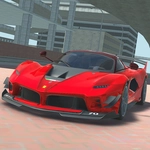
There's something oddly calming about just driving aimlessly through a blocky 3D city with no cops, no timer, and no mission markers screaming at you. Grand City Driving 2 gives you exactly that — a sandbox on wheels. You pick a car (or truck, or even a bus if you're feeling chaotic) and just drive. The physics lean arcade-y, so you can drift around corners without worrying about realistic tire grip, which means more time having fun and less time fighting the controls.
I spent a solid half hour trying to see if I could jump a sports car off a raised highway ramp and land on a building rooftop. Didn't work, but the crash looked great, and the car reset with zero fuss. That's the appeal: consequences are mild, so you experiment. Use WASD to steer, space to brake, and C to swap camera angles. The third-person chase cam feels best for high-speed runs, but the hood cam makes tight alleyways way more intense. One small gripe — the city could use more landmarks to navigate by, but if you just embrace the lost-driver vibe, it's weirdly relaxing.
You won't find a story here, or upgrades, or even traffic that reacts to you. It's a pure driving playground. That might sound thin, but sometimes after a long day you just want to cruise, smash into a fire hydrant, and see how far you can send a dumpster flying. Grand City Driving 2 gets that.
👥How to Play Grand City Driving 2
WASD - Drive. Space - Brake. C - Change camera.
✨Game Tips
If you want big air, aim for the ramps near the construction sites — the scaffolding makes a decent launch pad.
Switch to the hood or bumper camera before squeezing through narrow alleys; it makes judging your width way easier.
Don't sleep on the larger vehicles. The bus feels clumsy at first but can plow through traffic barriers like they're cardboard.
Use the brake sparingly — a quick tap before a turn gives you better rotation than holding it down.
Try reversing into objects at full speed. The physics get weird and hilarious, especially with the smaller cars.
If you get stuck on geometry, just hold space and wiggle left-right. Most of the time you'll pop free without needing a reset.
🔧FAQ
Q: Is Grand City Driving 2 free to play?
A: Yes, it's completely free in your browser with no paywalls or hidden charges.
Q: Can I play Grand City Driving 2 on mobile?
A: The game uses keyboard controls, so mobile play is not supported. A desktop or laptop works best.
Q: Do I need to download anything to start playing?
A: No downloads or installs. Just open the page and the game loads right in your browser.
Q: What are the controls for Grand City Driving 2?
A: WASD drives the vehicle, space is the brake, and C cycles through the available camera views.
Q: Does the game have any missions or objectives?
A: No, it's a free-roaming driving sandbox. You set your own goals, like stunts or exploration.
Q: Can I play Grand City Driving 2 at school or work?
A: Since it's an unblocked browser game, it usually runs fine on restricted networks without any setup.