
GTR Drift & Stunt
Play Count0
Published2020-08-13
Supported DevicesPC + Mobile
CategoryAdventure & RPG
Rating★★★★★5.0Rate this game
📝GTR Drift & Stunt Overview
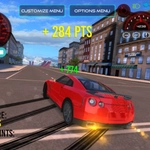
Slide a tuned GTR through hairpin corners at 150 mph, then launch off a ramp and pull a double backflip before the timer runs out.
💬What is GTR Drift & Stunt?
I spent way too long trying to nail a 360 entry into that corkscrew ramp. The GTR has this weighty, planted feel that makes drifting feel earned—you can't just flick the stick and magic happens. You've got to commit to the corner, feather the throttle, and hope your angle is right. When it clicks, the rear tires howl and the boost kicks in, slingshotting you into the next jump. The slow-mo button (G) is a lifesaver for lining up flips mid-air; I probably pressed it more than the accelerator.
The arena is a playground of concrete ramps, loops, and parked containers. Changing the camera (C) from chase to hood view completely changes how you approach a line—hood view makes precision drifts feel surgical, but chase view gives you the spatial awareness to string together stunts. The car color toggle (Y) is a nice touch; I cycled through every shade before settling on a matte black that hides the scrapes from failed landings. There's no timer or score system here, which is honestly refreshing. You just drive, drift, and experiment until you've discovered a line that feels impossible, then you do it again.
Don't expect a career mode or unlockables. It's a sandbox for car control. The physics lean arcade—no damage model, sticky collisions—but the drift mechanics have enough nuance to keep you chasing perfect entries. My only gripe? The camera can get stuck behind geometry if you wedge the car into a corner. That aside, it's the kind of game you open for five minutes and close an hour later.
👥How to Play GTR Drift & Stunt
Arrow Keys - Move Car
F - Boost
G - Slow Motion
C - Change Camera
Y - Car Colour Change
✨Game Tips
Use G for slow motion right before a jump to adjust your rotation.
Tap F for boost only after you've straightened out of a drift, or you'll spin.
Try hood camera (C) for tighter drift lines on the narrow ramps.
Change your car color (Y) to bright yellow so you can spot it mid-air.
Feather the arrow keys instead of holding them; the steering is sensitive at speed.
Don't land flat on all four wheels—angle slightly nose-first for smoother landings.
🔧FAQ
Q: Is GTR Drift & Stunt free to play?
A: Yes, it's completely free in your browser. No hidden fees or premium features.
Q: Can I play GTR Drift & Stunt on mobile?
A: The game is designed for keyboard controls. Mobile browsers may load it, but arrow keys aren't available, so it's not recommended.
Q: Do I need to download anything to play?
A: No downloads needed. It runs in HTML5, so just open the page and drive.
Q: What are the controls for GTR Drift & Stunt?
A: Arrow keys steer and accelerate. F boosts, G slows time, C changes camera, Y changes car color.
Q: Will my progress be saved?
A: There's no progress system. It's a sandbox stunt game, so every session starts fresh.
Q: Does GTR Drift & Stunt work offline?
A: Once the page loads, the game runs locally. You can disconnect and keep playing.