
Infinity Running
Play Count0
Published2021-09-29
Supported DevicesPC
CategoryAdventure & RPG
Rating★★★★★5.0Rate this game
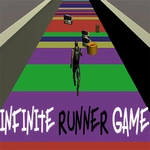
📝Infinity Running Overview
Sprint, jump, and dodge through an endless neon obstacle course that rearranges itself every single run, and see how far your reflexes actually are.
💬What is Infinity Running?
If you've played one endless runner, you think you know what you're in for. Infinity Running takes that formula and makes the world feel more alive. You're always moving forward — your only job is to not faceplant into the wall, the barriers, or the gaps that show up when the speed starts climbing. What got me was how the obstacles aren't just static. The layout shuffles every attempt, so muscle memory only gets you so far.
The control split is the part that takes a minute. Mouse steers your character left and right, and the keyboard handles jumps and slides. It sounds simple. It isn't. At higher speeds, steering with the mouse feels twitchy in the best way — like the difference between driving a go-kart and a sports car. I died more times than I'd like to admit on the third lap, right after a jump, because I tried to correct in the air and oversteered into a pillar.
What keeps me coming back is the small stuff: the way the camera leans into turns, the subtle screen shake when you clip a barrier but survive, and the fact that your distance becomes a personal high score you can't help trying to beat. If you want a quick hit of adrenaline between classes, this is the one I'd leave open in a tab.
👥How to Play Infinity Running
Use Mouse To Play and Keyboard
✨Game Tips
Start with small mouse movements; big flicks will throw you into walls at top speed.
Jump first, steer second — trying to change direction mid-air usually ends badly.
Learn the rhythm of obstacle clusters instead of reacting to each one individually.
Keep your focus about two meters ahead of your character, not on the horizon.
If a gap and a low barrier show up together, slide instead of jumping.
Don't chase coins at high speed; the extra distance is worth more than a pickup.
🔧FAQ
Q: Is Infinity Running free to play?
A: Yes, it is completely free to play in your browser with no paywalls or hidden fees.
Q: Can I play Infinity Running on my phone?
A: The game is designed for desktop browsers. Touch controls may work but mouse and keyboard are recommended.
Q: Do I need to download anything to play Infinity Running?
A: No downloads required. It runs in HTML5, so just open the page and start running.
Q: What are the controls for Infinity Running?
A: Use the mouse to steer left and right, and keyboard keys to jump and slide over or under obstacles.
Q: Why does my character keep crashing into walls?
A: You might be moving the mouse too aggressively. Try smaller, smoother movements, especially at higher speeds.
Q: Is Infinity Running suitable for school or work breaks?
A: Yes, it's a lightweight endless runner that loads quickly and can be paused or closed anytime.