
Isometric Cube
Play Count0
Published2020-07-30
Supported DevicesPC + Mobile
CategoryAdventure & RPG
Rating★★★★★5.0Rate this game
📝Isometric Cube Overview
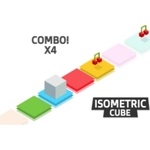
A tiny cube, a grid of floating islands, and a camera angle that lies to you—can you reach the end without stepping into the void?
💬What is Isometric Cube?
Isometric Cube feels like one of those old optical illusion tower puzzles, except now you're the one wobbling across it. You get a mouse click or the Z, X, C, V, and B keys to nudge, flip, and rotate a stubborn little cube around a tiled map. Half the battle is figuring out which input won't send you tumbling into the endless blue. The isometric camera is the real enemy here: a block that looks adjacent might be a full tile away, and the depth lies constantly. I love that the game never explains itself—you just press keys, watch the cube cartwheel off a ledge, and learn by failing.
My first run looked straightforward: three tiles forward, pivot right, done. Then I hit Z instead of X, flipped sideways off the edge, and watched the cube tumble forever into the void. That's when it clicked for me. It's not about speed; it's about reading depth before every move. Rotating the whole board with the mouse doesn't just change the view—it reveals gaps you'd swear weren't there a second ago. Short, sharp, and quietly infuriating, Isometric Cube is exactly the kind of lunch-break puzzle that makes you late getting back to work because you need one more attempt.
👥How to Play Isometric Cube
You can play with click Mouse or keyboard Z,X,C,V,B
✨Game Tips
Tap Z once before committing; a quick flip reveals hidden gaps the default camera hides.
Use the mouse click to rotate the whole board, not just the cube—perspective is your real health bar.
If a jump feels too far, try standing on the cube's edge before pressing C; it shifts your pivot point.
Don't chain moves. Settle after every input or residual momentum will drag you off.
Remember B isn't a reset—it's a backstep that can salvage a run if you're quick enough.
🔧FAQ
Q: Is Isometric Cube free to play?
A: Yes, it runs free in your browser with no paywalls or forced ads blocking the puzzles.
Q: Do I need to download anything to play Isometric Cube?
A: No downloads. It loads straight from the webpage as an HTML5 game.
Q: Can I play Isometric Cube on my phone?
A: The game works best with a keyboard or mouse, but touch support depends on your browser; results vary.
Q: What are the controls for Isometric Cube?
A: Use your mouse click or the Z, X, C, V, and B keys to move, flip, and rotate the cube.
Q: Why does Isometric Cube feel so difficult?
A: The isometric camera intentionally hides depth, so you have to rotate the view to judge real distances.
Q: Does Isometric Cube save my progress?
A: It's a one-session run; progress resets when you refresh, so finish in one sitting.