
Jelly Shift: Lite
Play Count0
Published2022-04-28
Supported DevicesPC + Mobile
CategoryAdventure & RPG
Rating★★★★★5.0Rate this game
📝Jelly Shift: Lite Overview
Squeeze, stretch, and squish your jelly through every shape-shifting obstacle—one sluggish miscalculation and you'll splat against the wall.
💬What is Jelly Shift: Lite?
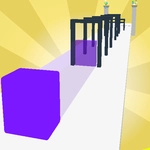
You wouldn't think a wobbling blob could be this tense. Jelly Shift: Lite has you sliding a glossy, squishy cube through a neon gauntlet, and every gate is a shape you have to match. Swipe up and your jelly stretches tall. Swipe sideways and it flattens into a pancake. The catch? The gaps keep changing—a tall rectangle becomes a fat square, then a narrow cross, then an infuriating little triangle that I still can't clear without overcorrecting.
What surprised me is how much of the game lives in your fingers, not your eyes. You don't steer left or right; you only control width and height. So when two gates appear in quick succession, you're frantically swiping mid-air to reshape before you slam into the wall. It's a one-more-run kind of frustration, the good kind. The speed ramps up gradually, and those first few easy circles are a lie—by gate fifteen, you'll be making micro-adjustments like you're defusing a bomb.
There's no story, no inventory, no meta. Just you, the jelly, and the obstacle. That's why it works as an unblocked game: instant to load, easy to learn, hard to put down. If you're playing on a phone, use small flicks rather than long drags. If you're on a PC, the mouse works fine, but touch is where the game feels most natural. I kept coming back purely to beat my own high score, and I suspect you will too.
👥How to Play Jelly Shift: Lite
You need to adjust the shape of the jelly so that it fits into the obstacle.
In order to pull it up, you need to swipe your finger or the cursor up.
In order to stretch the jelly in breadth, you need to swipe your finger or the curso
✨Game Tips
Swipe in the air, not just on the jelly—your finger doesn't need to touch it.
Read the next shape early; your jelly keeps its last dimensions as you slide.
Wide gaps are traps: going full flat feels safe but slows your forward drift.
A quick upward flick beats a long drag for tall narrow slots.
Don't panic-switch between wide and tall—smooth adjustments keep your speedline alive.
The first few gates are forgiving; use them to learn the swipe distance.
🔧FAQ
Q: Is Jelly Shift: Lite free to play?
A: Yes, it's completely free in your browser—no payment or subscription required.
Q: Can I play Jelly Shift: Lite on my phone?
A: Absolutely. The game is designed for touch: swipe up to stretch vertical, sideways to widen.
Q: Do I need to download anything to start?
A: No download needed. It runs in any modern browser that supports WebGL and HTML5.
Q: What if I get stuck on a tricky obstacle?
A: Try making smaller, faster adjustments. Overshooting the shape is the most common way to splat.
Q: Does Jelly Shift: Lite track my high score?
A: Yes, it automatically records your best run; beat it by surviving more gates in one go.
Q: Is this game safe for kids at school?
A: It's an unblocked version, so it works on school networks and has no gore or violence.